Over the past few years, Microsoft has been making significant improvements to its Paint app for Windows 11, including adding layers, a dark mode, transparency, and even AI-powered image creation. Microsoft is now giving Paint two new features that are similar to Photoshop.
With the released, which is the largest Paint update in years, giving the Windows 11 users access to professional-grade brush opacity controls along with project files that save layers and work-in-progress edits. While Notepad’s new AI features make productivity apps more intelligent overall, Microsoft’s decades-old software now directly competes with Adobe’s creative tools thanks to the.paint file format.
Microsoft has upgraded its modest Paint software to a powerful tool that might rival Adobe. Project files, opacity controls, and AI-powered capabilities that bridge the gap between professional creative software and simple drawing tools are being introduced by the company.
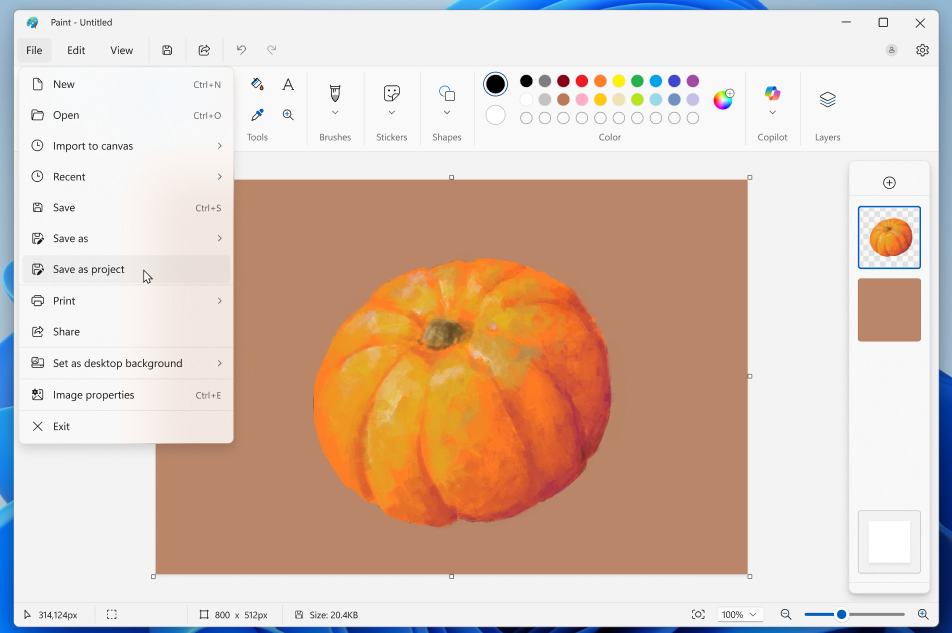
Your Paint creations will soon be able to be saved as a project file, which is similar to a Photoshop document (.PSD). Currently, Windows Insiders is testing the Paint project files in the Dev and Canary Channels. Principal product manager lead for Microsoft’s Windows mail programs, Dave Grochocki says, “You can now save your creation as an editable Paint project file and pick up where you left off.”
As you may expect, paint files will be saved with the extension “.paint.” Your layers will also be stored inside paint files. “Just open the file to start it in Paint where you left off when you’re ready to go back,” advises Grochocki.
A quick look at the image below demonstrates how Microsoft Paint will be saved with the feature.
In addition, Microsoft is incorporating opacity sliders to modify the transparency of Paint’s brush and pencil tools. To begin, Grochocki advises choosing any tool and adjusting the opacity to the correct amount using the slider on the left side of the canvas.
If you enjoy using Windows 11’s Snipping Tool, Microsoft is now introducing a fast markup function that makes annotating screenshots simpler. In addition to the ability to quickly re-crop an image, the markup toolbar includes a highlighter, pen, and eraser tool.
Lastly, Microsoft is giving Copilot Plus PC customers access to AI-powered writing, summarisation, and rewriting as a free function within Notepad. Grochocki claims that you can “seamlessly switch between local and cloud models based on your needs,” but you won’t need a Microsoft 365 membership to use this. This Notepad functionality is powered by Microsoft’s local models on Copilot Plus PCs.
Another step towards professional skills is represented by the opacity controls. There are new sliders on the left side of the canvas that allow users to change the transparency levels of the pencil and brush tools. According to Grochocki’s announcement, “to get started, select either tool and use the slider on the left side of the canvas to adjust the opacity to your desired level,” This places Paint on par with well-known painting programs that require a monthly membership.
Additionally, Microsoft is adding markup capabilities to the Snipping Tool, putting it in direct competition with third-party programs for screenshot annotation. Highlighter, pen and eraser tools as well as re-cropping options are included in the new toolbar, which simplifies the process of sharing screenshots. This is yet another indication that Microsoft is transforming simple Windows utilities into all-inclusive productivity solutions.
However, Notepad’s AI integration may be the most important long-term development. Without requiring a Microsoft 365 membership, Copilot Plus PC users can access free AI-powered writing, summarisation, and rewriting tools. Grochocki stresses Microsoft’s hybrid AI strategy, which uses cloud computing for sophisticated operations while processing other jobs locally. “You can seamlessly switch between local and cloud models based on your needs,” Grochocki says.
With this approach, Microsoft outperforms rivals who are still calculating the expenses of integrating AI. They are encouraging people to purchase their newest PCs by providing these features for free on Copilot Plus hardware, which increases reliance on Microsoft’s AI ecosystem. This type of platform play is what initially made Windows so dominant.
It’s not just a coincidence. Google promotes browser-based creative tools, whereas Adobe is coming under growing fire for its subscription pricing and AI scandals. Microsoft is placing a bet that updating well-known, free programs will draw in customers who desire premium features without having to pay for them on a monthly basis or worry about their privacy.
Windows Insiders are now evaluating these changes in the Dev and Canary channels, indicating a wider release in the coming months. It signifies a significant change for Microsoft from viewing built-in programs as rudimentary tools to viewing them as competitive substitutes for expensive software.
In an attempt to lock customers into their ecosystem while device sales propel Copilot Plus usage, Microsoft is transforming Windows 11’s built-in apps into viable substitutes for expensive software. Apps that are already installed on millions of PCs might pose a significant threat to Adobe and Google’s browser-based creative tools if these features live up to the hype. When these improvements become widely available, the true test will be whether Microsoft can continue to innovate at this rate across its whole app portfolio.
Related Reading
More contextual TechBooky stories selected from tags, categories and article context.
We use cookies to ensure that we give you the best experience on our website. If you continue to use this site we will assume that you are happy with it.