Signal is restricting AI assistants built into iPhones and Android phones from reading conversations displayed inside its messaging app. In a 20 November announcement, Signal president Meredith Whittaker said operating-system agents could capture information from an app’s screen and make it available to their own services, even when the app itself protects messages with end-to-end encryption.
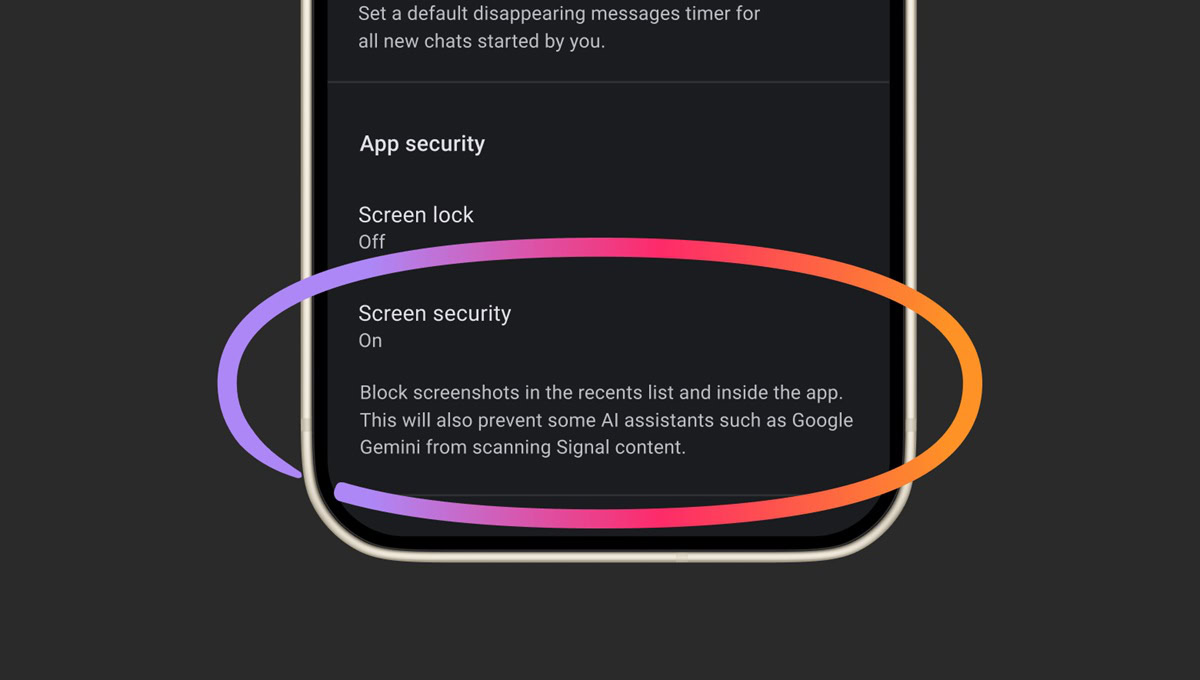
The response is a new layer of screen security. On supported iPhones running iOS 27, Signal’s Block Siri AI setting is on by default. On Android, Signal says Screen security switches on automatically the first time an AI assistant tries to read its screen, and users can enable it sooner. The measures are designed to prevent screen capture and on-device AI reading in Signal. They do not change the encryption of a message or prove that Apple or Google has accessed any particular user’s chats.
According to Signal’s support guidance, Android users need Signal 8.35.1 or later. The supported iPhone version is Signal 8.37 or later on iOS 27 or later. While protection is active, screenshots and screen recordings inside the app are blocked, its content is hidden from the recent-apps view, and on-device assistants are prevented from reading what is on the Signal screen.
On iPhone, the setting is under Settings, Privacy, Block Siri AI. It can be turned off permanently or for ten minutes if a user needs a screenshot. Android users can find Screen security under Settings, Privacy, App security. Turning the protection off may allow an assistant with screen access to process visible chat content, so the choice affects other people in a conversation as well as the device owner.
End-to-end encryption secures a message while it travels and limits who can decrypt it. But a phone must display the decrypted message for its intended recipient to read. An AI agent with operating-system access to that screen could encounter the content after decryption. Signal argues that this creates a privacy boundary outside its direct control. It took a similar step on Windows to prevent Microsoft’s Recall feature from capturing Signal conversations. TechBooky covered that earlier screen protection when reporting on Signal’s backup options.
Signal says its new controls are incomplete. Blocking a screenshot does not necessarily prevent an agent from finding information through notifications, files or another system interface. Android implementations vary, and the company says it cannot yet offer equivalent screenshot blocking for Siri AI on macOS. It is asking Apple, Google and Microsoft for documented ways to let privacy-sensitive apps opt out of AI data access without disabling ordinary app functions.
The dispute reaches beyond one messenger. AI assistants promise to act across apps, but useful access can become overbroad access when a screen contains medical, financial or private conversations. Developers need to know what an agent can see, where the information is processed and how to exclude sensitive content. Apple’s work on cross-app agents illustrates why these questions are becoming more urgent.
For now, Signal’s practical advice is straightforward. Keep the app updated, leave screen security enabled unless a screenshot is necessary, and understand that disabling it can expose conversation text to AI features operating outside Signal’s encryption model. The broader answer will depend on whether phone platforms give app makers a reliable, granular way to say no to AI access.
Related Reading
More contextual TechBooky stories selected from tags, categories and article context.
Paul Femi Balo is the founder and publisher of TechBooky. He covers artificial intelligence, African technology, digital infrastructure, enterprise technology and the global digital economy.
We use cookies to ensure that we give you the best experience on our website. If you continue to use this site we will assume that you are happy with it.