TechBooky AI Assistant
👋 Welcome to TechBooky AI Assistant

I can help with:
🔎 Tech News
🤖 AI Topics
💻 Gadgets
☁️ Cloud
✍️ Guest Posts
📢 Advertising
🔗 Backlinks
📩 Newsletter
  • AI Search
  • Cryptocurrency
  • Earnings
  • Enterprise
  • About TechBooky
  • Submit Article
  • Advertise With TechBooky
  • Contact Us
TechBooky
  • African
  • AI
  • Metaverse
  • Gadgets
Generic selectors
Exact matches only
Search in title
Search in content
Post Type Selectors
Search in posts
Search in pages
  • African
  • AI
  • Metaverse
  • Gadgets
Generic selectors
Exact matches only
Search in title
Search in content
Post Type Selectors
Search in posts
Search in pages
TechBooky
Generic selectors
Exact matches only
Search in title
Search in content
Post Type Selectors
Search in posts
Search in pages
Home General App

WhatsApp Adds Multiple Accounts For iOS

Akinola Ajibola by Akinola Ajibola
March 26, 2026
in App, Social Media
Share on FacebookShare on Twitter
Share this story

Send it to someone who should read it.

f Facebook X X in LinkedIn wa WhatsApp tg Telegram @ Email
In Brief
  • WhatsApp is at it again as part of its significant update, as it announced several quality-of-life enhancements that will be available on its chat app starting...
  • This means that having two accounts on a single iOS device is the first long-awaited option.
  • Users of iPhones may now log into two different accounts simultaneously, a feature that has been available for years on Android.

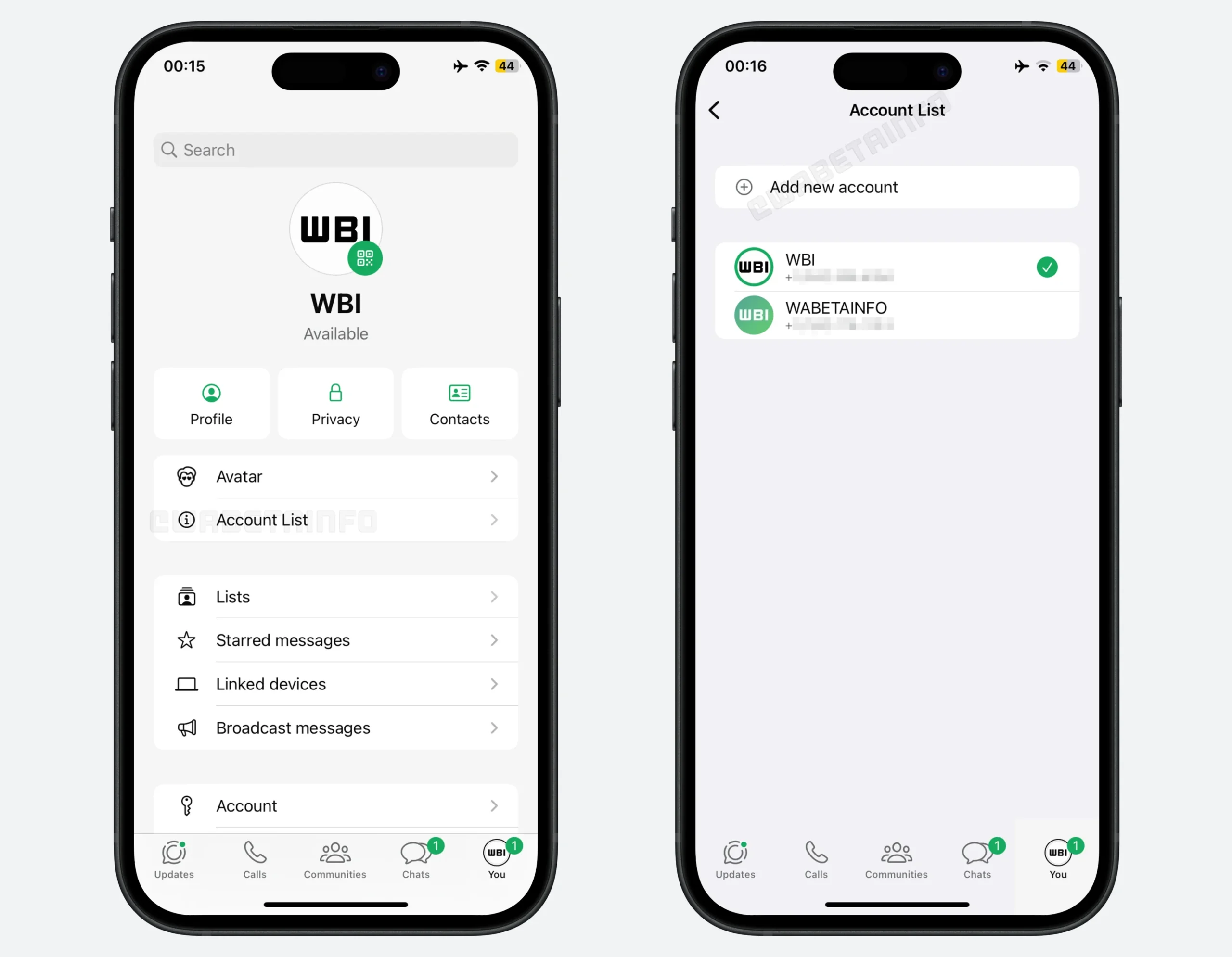
WhatsApp is at it again as part of its significant update, as it announced several quality-of-life enhancements that will be available on its chat app starting today. WhatsApp formally began introducing multi-account capability for iOS. This means that having two accounts on a single iOS device is the first long-awaited option. Users of iPhones may now log into two different accounts simultaneously, a feature that has been available for years on Android. To confirm whose persona you are messaging as, the account’s profile picture will be displayed on the bottom tab.

This is without the need for a second phone or the WhatsApp Business app; this eagerly anticipated feature enables iPhone users to manage two WhatsApp accounts, such as a personal and a professional profile, simultaneously on a single device.

Chat history can be moved more easily between platforms and devices within the same ecosystem thanks to the other new features. When upgrading to a new phone, especially if you’re transferring between iOS and Android, this chat transfer should make it easier to remember messages. To prevent storage clutter, there’s now a new option to remove big files straight from a WhatsApp discussion. You can access it by tapping the name of a chat under the Manage Storage option. One of its features is the ability to remove only media files from a chat.

Naturally, without at least some AI elements, it wouldn’t be a tech news announcement. WhatsApp now allows light photo editing with Meta AI, such as eliminating backgrounds, altering aesthetic styles, and removing composition elements. Additionally, there is a Writing Help prompt that uses AI to assist with message drafting; nevertheless, according to Meta’s blog post, employing this still maintains chat privacy. All WhatsApp users should receive the aforementioned capabilities “soon,” according to the firm.

Also worth reading
WhatsApp Tests A Business Folder To Tame Brand Messages Myspace Comeback Would Test Social Media Nostalgia Snap Revenue Rises As Snapchat Moves Beyond Ads Alone WhatsApp Plus Launches On iOS With Premium Features iOS 27 Reportedly Adds New Apple Intelligence Photo Editing Tools Reddit Earnings Beat As AI Search Turns Its Human Data Into A Bigger Question

The key update features that comes with this on the iOS device as announced are

  • Dual Accounts: Log into two accounts on one iPhone with profile picture indicators.
  • Cross-Platform Transfer: Native chat migration now available between iOS and Android.
  • Storage Management: Delete large files from individual chats while keeping text.
  • Meta AI Enhancements: AI photo editing (remove objects, change backgrounds, apply styles) and contextual reply suggestions
  • Emoji-triggered sticker recommendations

To use the multiple accounts, users need to follow these easy steps

  • Update: Install the latest version from the Apple App Store.
  • Add Account: Go to your Profile tab, tap the arrow next to your name (or “Account List”), and select Add Account.
  • Requirements: A second phone number with SIM or eSIM is needed for verification.
  • Switching: Toggle between accounts from the profile menu or by double-tapping the settings tab.

And note that the feature is rolling out globally in phases, so it may take a few weeks or months to appear on your device, as this is a gradual process.

Related Reading

More contextual TechBooky stories selected from tags, categories and article context.

  • WA_MANAGE_ADD_USE_SWITCH_MULTIPLE_ACCOUNTS_SAME_DEVICE_FEATURE_IOS
    WhatsApp Brings Multi-Account Feature to iOS Beta
  • WA_NEW_MULTIPLE_ACCOUNTS_FEATURE_SETTINGS_IOS
    WhatsApp Plans to Introduce Multiple Accounts Feature on iOS
  • WA_PROFILE_PHOTO_FROM_INSTAGRAM_FACEBOOK_FEATURE_ANDROID
    WhatsApp Tests Profile Photo Import from Instagram, Facebook
  • skynews-instagram-meta-facebook_6688367
    WhatsApp iOS Users May Soon Link Instagram Profiles
  • WA_ADD_FACEBOOK_PROFILE_LINKS_FEATURE_ANDROID
    WhatsApp Beta Adds Option to Link Facebook Profile
  • 499920413_726083126518205_4604772183644586656_n
    WhatsApp Adds Encrypted Voice Chat to All Groups
  • whatsapp_assistance
    WhatsApp Adds AI-Powered Reply Suggestions
  • whatsapp-status
    WhatsApp Tests Quick Status Sharing to Facebook & Instagram
Keep Reading Smarter

Search TechBooky with AI

Use TechBooky's AI Search to explore the context behind this story and related coverage across the site.

Try AI Search
More On This Topic
App Social Media
Follow TechBooky

Follow TechBooky for more technology stories and newsroom updates.

f Facebook X X in LinkedIn ig Instagram wa WhatsApp

Tags: iossocial mediawhatsapp
Akinola Ajibola

Akinola Ajibola

Search TechBooky
Open TechBooky AI Search Try the AI Assistant

BROWSE BY CATEGORIES

Receive top tech news directly in your inbox

subscription from
Loading

Freshly Squeezed

  • Myspace Comeback Would Test Social Media Nostalgia August 10, 2026
  • China Review Of Palo Alto Networks Deepens Tech-Security Split August 10, 2026
  • Ethio Telecom And ZTE Push Ethiopia Closer To Nationwide 4G August 10, 2026
  • SeerBit Adds PayPal To Help African Merchants Sell Globally August 10, 2026
  • Nigeria Crypto Tax Rules Put VASPs On The Hook August 10, 2026
  • Nigeria Local Cloud Push Is Now About AI Sovereignty August 10, 2026
  • Data-Centre Bans Turn AI Compute Into Local Politics in the U.S August 10, 2026
  • Claude Agent Gym Hack Shows Everyday AI Risk August 10, 2026
  • Why China May Win The AI Race And How The US Can Still Fight August 9, 2026
  • Open-Weight AI Models Explained And Why They Matter August 9, 2026
  • African Banks Are Spending On AI Before Measuring ROI August 8, 2026
  • OpenAI Slows Astra After Critical Cyber Warning August 8, 2026

Browse Archives

August 2026
M T W T F S S
 12
3456789
10111213141516
17181920212223
24252627282930
31  
« Jul    

Quick Links

  • About TechBooky
  • Advertise With TechBooky
  • Contact us
  • Submit Article
  • Privacy Policy
Generic selectors
Exact matches only
Search in title
Search in content
Post Type Selectors
Search in posts
Search in pages
  • African
  • Artificial Intelligence
  • Gadgets
  • Metaverse
  • Tips
  • AI Search
  • About TechBooky
  • Advertise With TechBooky
  • Submit Article
  • Contact us

© 2025 Designed By TechBooky Elite

Discover more from TechBooky

Subscribe now to keep reading and get access to the full archive.

Continue reading

We use cookies to ensure that we give you the best experience on our website. If you continue to use this site we will assume that you are happy with it.