TechBooky AI Assistant
👋 Welcome to TechBooky AI Assistant

I can help with:
🔎 Tech News
🤖 AI Topics
💻 Gadgets
☁️ Cloud
✍️ Guest Posts
📢 Advertising
🔗 Backlinks
📩 Newsletter
  • AI Search
  • Cryptocurrency
  • Earnings
  • Enterprise
  • About TechBooky
  • Submit Article
  • Advertise With TechBooky
  • Contact Us
TechBooky
  • African
  • AI
  • Metaverse
  • Gadgets
Generic selectors
Exact matches only
Search in title
Search in content
Post Type Selectors
Search in posts
Search in pages
  • African
  • AI
  • Metaverse
  • Gadgets
Generic selectors
Exact matches only
Search in title
Search in content
Post Type Selectors
Search in posts
Search in pages
TechBooky
Generic selectors
Exact matches only
Search in title
Search in content
Post Type Selectors
Search in posts
Search in pages
Home Security

WhatsApp Adds Password Feature for Stronger Account Security

Akinola Ajibola by Akinola Ajibola
February 24, 2026
in Security, Social Media
Share on FacebookShare on Twitter
Share this story

Send it to someone who should read it.

f Facebook X X in LinkedIn wa WhatsApp tg Telegram @ Email
In Brief
  • We have heard of WhatsApp users complaining of being hacked several times, to the extent of them not being reachable on the social network for days.
  • In an attempt to improve the security of personal accounts, Meta-owned WhatsApp announced the release of a new password function for its iOS and Android customers.
  • This aims to also offer an extra degree of protection during the login process to avoid the unnecessary hacking experiences faced by users globally; WhatsApp has...

We have heard of WhatsApp users complaining of being hacked several times, to the extent of them not being reachable on the social network for days. And this new feature is here to address this menace.

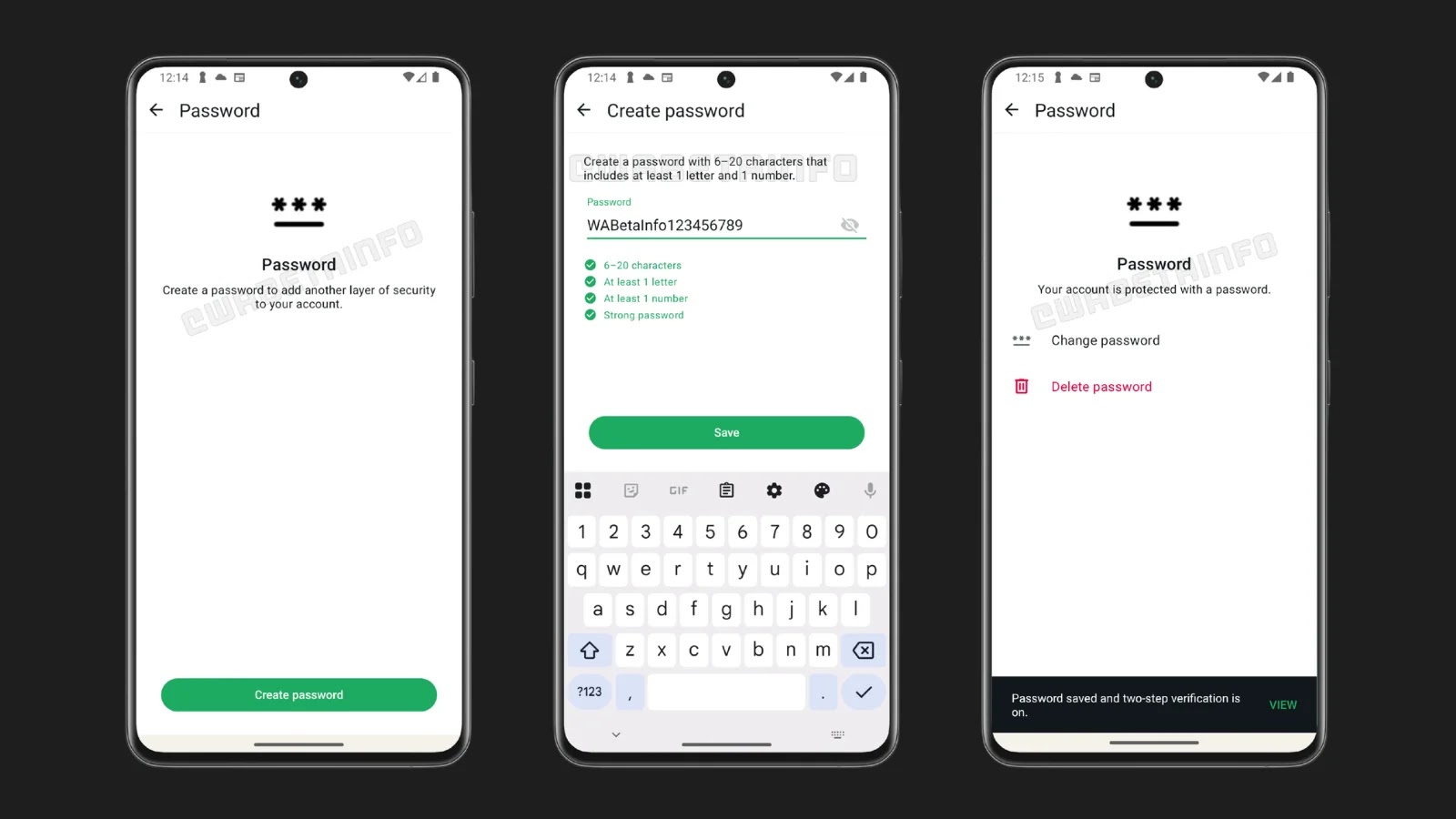
In an attempt to improve the security of personal accounts, Meta-owned WhatsApp announced the release of a new password function for its iOS and Android customers.

This aims to also offer an extra degree of protection during the login process to avoid the unnecessary hacking experiences faced by users globally; WhatsApp has added the option to create an account password. 

By requiring WhatsApp users to input a password (a second verification code) after successfully registering their phone number, the new feature adds an additional layer of security and makes it more difficult for unauthorised users to access the account. Even if someone is able to get your 6-digit SMS verification code, for example, by SIM swapping or device compromise, this update attempts to stop unwanted access.

It will be possible for users to construct a password that is between six and twenty characters long, with at least one letter and one number. Additionally, the app will show a strength indication to assist users in selecting stronger passwords.

Users will have complete freedom and control over account security because creating a password is optional, and they can change or remove it whenever they like. However, after providing the six-digit verification number upon account login, the password will always be needed.

Also WhatsApp users on iOS and Android are progressively getting access to the feature. This comes after other recent security improvements like Strict Account Settings, a “lockdown mode” that blocks unexpected attachments and mutes questionable calls for high-risk users like public figures and journalists.

Also worth reading
WhatsApp Is Developing On-Device Scam Detection Feature For Android Users Meta’s $18B Teen Safety Deal Turns Social Media Into A Regulated Product YouTube’s New View Count Rule Makes Creator Numbers Messier TikTok’s $400M Privacy Settlement Shows Child Safety Costs Are Rising Reddit Tests AI Audio And Video Posts As The Platform Chases Its Own Story Format Myspace Comeback Would Test Social Media Nostalgia

This action is a component of WhatsApp’s continuous endeavours to improve personal account security and lower the possibility of security breaches. Over the next few months, the feature will be progressively introduced.

For the newly introduced new feature on WhatsApp, the important information every user, both on Android and iOS, needs to know is that the password strength should include the following: alphanumeric characters or code and a strength indicator – what this means is the feature comes with an aid for users in choosing a stronger, more secure password, and the app has an integrated strength indicator. 

With the aid of the alphanumeric characters or codes, users will be required to include at least one letter and one number in their passwords, which can range from six to twenty characters.

Also, it comes with a dual verification for those having Two-Step Verification (2FA) enabled on WhatsApp on their device. The app will ask for your 2FA PIN first, then this new account password. 

A feature of complete control: by using your account settings, you can enable, change, or remove the password at any moment.

Make sure your app is updated to the most recent version from the Google Play Store or Apple App Store to see if the functionality is available on your device.

Related Reading

More contextual TechBooky stories selected from tags, categories and article context.

  • WA_NEW_MULTIPLE_ACCOUNTS_FEATURE_SETTINGS_IOS
    WhatsApp Plans to Introduce Multiple Accounts Feature on iOS
  • WA_STRICT_SECURITY_ACCOUNT_SETTINGS_FEATURE_ANDROID
    WhatsApp Tests ‘Strict Account Settings’ for Better Security
  • English_WhatsApp_passkey-encrypted-backups-1
    WhatsApp Passkey Protection For Encrypted Backups:…
  • WA_PROFILE_PHOTO_FROM_INSTAGRAM_FACEBOOK_FEATURE_ANDROID
    WhatsApp Tests Profile Photo Import from Instagram, Facebook
  • WA_GUEST_CHAT_SHARE_MESSAGES_WITH_NO_WHATSAPP_USERS_ANDROID
    Guest Chats Comes To WhatsApp On Android & iOS
  • skynews-instagram-meta-facebook_6688367
    WhatsApp iOS Users May Soon Link Instagram Profiles
  • WA_DOCUMENT_SCANNING_WITH_CAMERA_FEATURE_ANDROID
    WhatsApp Adds Document Scanning Feature for Android
  • WA_ADD_FACEBOOK_PROFILE_LINKS_FEATURE_ANDROID
    WhatsApp Beta Adds Option to Link Facebook Profile
Keep Reading Smarter

Search TechBooky with AI

Use TechBooky's AI Search to explore the context behind this story and related coverage across the site.

Try AI Search
More On This Topic
Security Social Media
Follow TechBooky

Follow TechBooky for more technology stories and newsroom updates.

f Facebook X X in LinkedIn ig Instagram wa WhatsApp

Tags: social mediawhatsappwhatsapp password
Akinola Ajibola

Akinola Ajibola

Search TechBooky
Open TechBooky AI Search Try the AI Assistant

BROWSE BY CATEGORIES

Receive top tech news directly in your inbox

subscription from
Loading

Freshly Squeezed

  • Opinion: AI Labs Want Cheap Debt Before Real Profits September 8, 2026
  • EU Merger Reset Could Help Build Tech Champions September 8, 2026
  • Huawei Trial Could Reopen The US-China Tech War September 8, 2026
  • Apple’s $2,000 iPhone Moment Is About AI Costs September 8, 2026
  • OpenAI And Anthropic Seek Cheap Debt Before IPOs September 8, 2026
  • Samsung Wallet Brings QR Payments To South Africa September 7, 2026
  • Sav Raises $3.5M As AI Fintech Heads To Saudi Arabia September 7, 2026
  • Dell And Armada Push Mobile Edge Data Centres September 7, 2026
  • OpenAI’s Osborne Says AI Must Fix Cyber Risk Too September 7, 2026
  • Opinion: Data Centre Backlash Is A Trust Problem September 7, 2026
  • Asia Chip Rally Shows AI Hardware Momentum September 7, 2026
  • US-China AI Safety Talks Put Agent Risk On The Table September 7, 2026

Browse Archives

September 2026
M T W T F S S
 123456
78910111213
14151617181920
21222324252627
282930  
« Aug    

Quick Links

  • About TechBooky
  • Advertise With TechBooky
  • Contact us
  • Submit Article
  • Privacy Policy
Generic selectors
Exact matches only
Search in title
Search in content
Post Type Selectors
Search in posts
Search in pages
  • African
  • Artificial Intelligence
  • Gadgets
  • Metaverse
  • Tips
  • AI Search
  • About TechBooky
  • Advertise With TechBooky
  • Submit Article
  • Contact us

© 2025 Designed By TechBooky Elite

Discover more from TechBooky

Subscribe now to keep reading and get access to the full archive.

Continue reading

We use cookies to ensure that we give you the best experience on our website. If you continue to use this site we will assume that you are happy with it.