• AI Search
  • Cryptocurrency
  • Earnings
  • Enterprise
  • About TechBooky
  • Submit Article
  • Advertise Here
  • Contact Us
TechBooky
  • African
  • AI
  • Metaverse
  • Gadgets
Generic selectors
Exact matches only
Search in title
Search in content
Post Type Selectors
Search in posts
Search in pages
  • African
  • AI
  • Metaverse
  • Gadgets
Generic selectors
Exact matches only
Search in title
Search in content
Post Type Selectors
Search in posts
Search in pages
TechBooky
Generic selectors
Exact matches only
Search in title
Search in content
Post Type Selectors
Search in posts
Search in pages
Home Gadgets

Google Redesigns Gboard Shortcuts With M3 Expressive UI

Akinola Ajibola by Akinola Ajibola
January 8, 2026
in Gadgets
Share on FacebookShare on Twitter

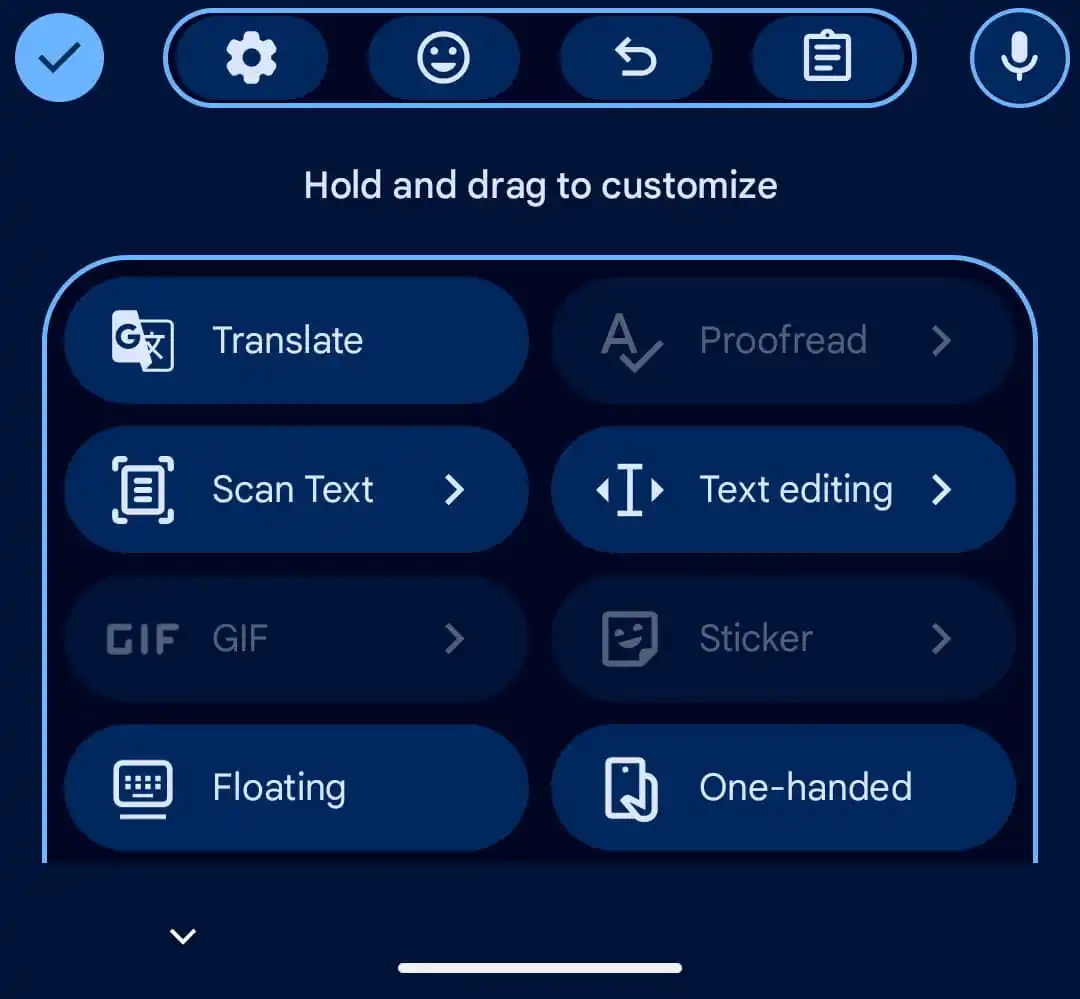
Gboard for Android is gradually becoming M3 Expressive, as it started releasing its Material 3 (M3) Expressive redesign for the shortcuts page, putting contemporary aesthetics and visual clarity ahead of information density, although density is sacrificed in the makeover of the shortcuts page. 

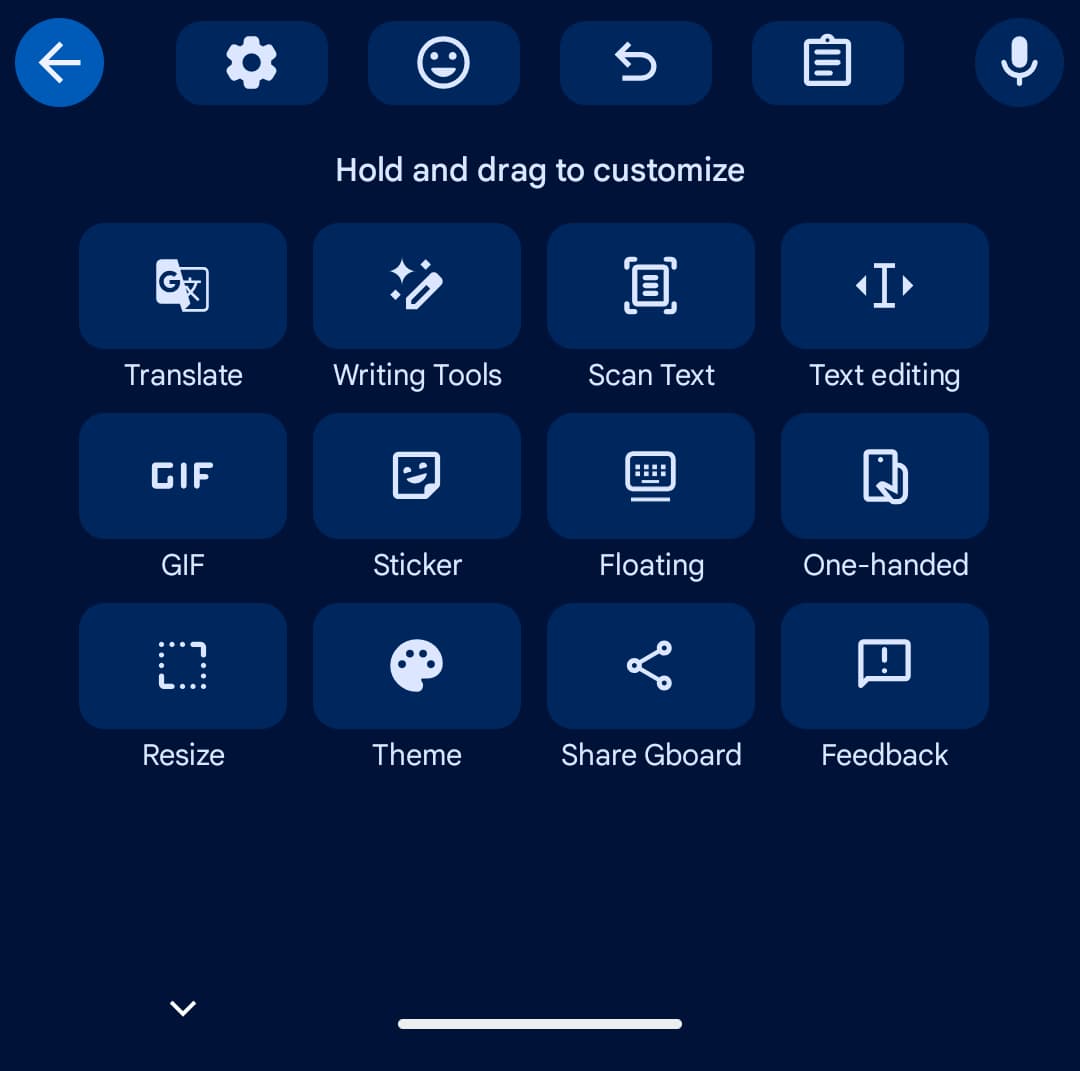
Everything was previously shown as a grid on the shortcuts page. Every item was arranged on a rectangular card that could be resized to fit in a single view without the need to scroll.

The importance of the modifications to the redesign consist of:

  • Enlarged UI Elements: Icons are essentially same, but text labels are much larger. Sometimes labels like “Share Gboard” need to be internally scrolled since they no longer fit inside their containers.
  • Pill-Shaped Shortcuts: Previously shown in a small, rectangular grid, shortcuts are now included in big, rounded pills with just two entries per row. With two shortcuts per row, the Material 3 Expressive redesign arranges everything into a rounded pill.
  • Updated Suggestions Strip: The “back” button has been replaced with a close “x” in the upper-left corner, and shortcut containers have been eliminated.
  • Paginated Navigation: Users now need to swipe horizontally to access more shortcut pages rather than a vertically scrollable list that could frequently fit all shortcuts in one view.
  • Its Modernised Settings: M3 Expressive containers, which organise related preferences into pill-shaped bubbles for better access, have been added to the main settings menu. 

To view the next shortcut page, swipe left rather than scroll. The text labels are much larger, but the icons remain the same. However, because it is too big for the container, “Share Gboard” may scroll.


Comparing the old and the new Google Gboard

The back button is swapped out for a close “x” in the upper-left corner, and shortcuts in the recommendations strip drop their container.

On the “Hold and drag to customise” page, tap the pencil symbol to make changes using M3 Expressive containers.

A makeover of the Settings page has also been tried by Gboard in recent weeks. This is a simple modernisation that groups related preferences using containers.

Although the shortcuts page only showed up on one of our devices today with version 16.5.2.x, the Gboard Settings makeover is becoming more widely available.

This upgrade is a part of a larger system-wide rollout of Material 3 Expressive, which started with Android 16 and is intended to boost visual hierarchy and make important UI elements up to four times faster to find.

Related Posts:

  • Android-16-Material-3-Expressive-cover
    Google Unveils Material 3 Redesign for Android 16
  • Gboard_logo.svg
    Google Adds Undo Button to Gboard for Android
  • material-you-google-account-switcher-before-after
    Android's Google Account Switcher Gets a Fullscreen…
  • Android_16_blog_header.width-1600.format-webp
    Android 16 Update: Release Date, Device Support, and…
  • Media
    Microsoft Reveals Rejected Start Menu Redesigns
  • telegram liquid glass
    Telegram Launches Android Redesign With Liquid Glass UI
  • safari-icon-blue-banner
    Apple To Unveil New Features Of AI-Powered Safari…
  • expressive_captions_1733495050739
    AI-Powered Expressive Captions for Android Have…

Discover more from TechBooky

Subscribe to get the latest posts sent to your email.

Tags: gboardgooglematerial 3
Akinola Ajibola

Akinola Ajibola

BROWSE BY CATEGORIES

Receive top tech news directly in your inbox

subscription from
Loading

Freshly Squeezed

  • Qodo 2.1 Tackles Coding Agents’ ‘Amnesia’ Issue February 17, 2026
  • Nigeria’s Data Regulator Opens Privacy Probe Into Temu’s Operations February 17, 2026
  • iPhone Fold Rumours: Design, Upgrades and Price February 17, 2026
  • EU Opens Second Probe Into Grok Over Image Generation February 17, 2026
  • Microsoft Teams Faces Class Action Over Voice Data Claims February 17, 2026
  • Warner Bros. Discovery May Reopen Paramount Talks February 17, 2026
  • OpenClaw Creator Peter Steinberger Joins OpenAI February 16, 2026
  • Google Pixel to Get Dedicated Now Playing App on Play Store February 16, 2026
  • Threads Introduces AI ‘Dear Algo’ Feed Feature February 16, 2026
  • Tesla’s Apple CarPlay Support Delayed Over iOS 26 Issues February 15, 2026
  • Kenya Tightens Nil Tax Returns as Nigeria Targets Failed Airtime and Data Debits February 15, 2026
  • Apple: Two-Thirds of iPhones Now Run iOS 26 February 14, 2026

Browse Archives

February 2026
MTWTFSS
 1
2345678
9101112131415
16171819202122
232425262728 
« Jan    

Quick Links

  • About TechBooky
  • Advertise Here
  • Contact us
  • Submit Article
  • Privacy Policy
Generic selectors
Exact matches only
Search in title
Search in content
Post Type Selectors
Search in posts
Search in pages
  • African
  • Artificial Intelligence
  • Gadgets
  • Metaverse
  • Tips
  • AI Search
  • About TechBooky
  • Advertise Here
  • Submit Article
  • Contact us

© 2025 Designed By TechBooky Elite

Discover more from TechBooky

Subscribe now to keep reading and get access to the full archive.

Continue reading

We use cookies to ensure that we give you the best experience on our website. If you continue to use this site we will assume that you are happy with it.