Google is making it simpler to ensure that every user’s personal information, such as your email address, phone number, or location, doesn’t reappear online.
On Wednesday, Google said that it is improving its “Results about Google users” feature to help people safeguard and delete their personal data from search results. The business claims to have streamlined the sign-up procedure and made it easier to request deletions straight from Google Search.
You may use the tool to proactively monitor and remove information from search results, such as your phone number, email address, or physical address.
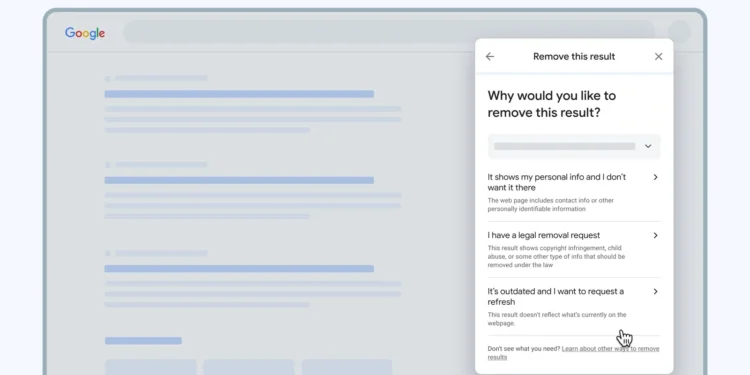
Users may now click the three dots next to a Google search result to get an enhanced menu that allows them to immediately submit a removal request by selecting the “remove this results” option. This is the most recent change.
Previously, you would have needed to access the “Results about you” function, which was tucked away in the settings of your Google account.
Additionally, users may now request a refresh of their information via the three-dot menu.
For example, you can ask for a refresh if you have deleted personal information from a website and Search hasn’t been updated to reflect this. This will allow Google’s computers to “recrawl” the page and get the most recent data.
In order to utilize the function, you must fill out a form with your contact details so that Google can verify that they match the information on a search results page. If Google discovers results using your information, you have the option to be notified.
The business states that your data is not exchanged or utilized to tailor your Google product experience.
Users in the United States, United Kingdom, Ireland, Australia, Canada, South Africa, Brazil, Mexico, Spain, France, Sweden, Thailand, India, and Indonesia can access the function.
You may now ask for removal directly from Google Search. Here’s the method for deleting your data from Google Search
Clicking the three dots next to a result that contains your personal information will bring up a menu with details about the link, along with a “Remove result” button. After selecting that, you’ll be presented with a variety of reasons for wanting it deleted.
The headline reads “It shows my personal information and I don’t want it here.” Selecting that option causes Google to examine the page. It will be taken off of search results if Google determines it is against its rules.
Although the original website will remain accessible, the majority of online directories offer the ability to request that your information be deleted. You’ll want to take advantage of it, as fraudsters are increasingly using this kind of information.
Additionally, the three-dot menu offers choices to update out-of-date search results (for situations when you have requested information removal and Google is still indexing an old website) and delete unlawful content, such as phishing, violence, or sexual content.
Related Reading
More contextual TechBooky stories selected from tags, categories and article context.
We use cookies to ensure that we give you the best experience on our website. If you continue to use this site we will assume that you are happy with it.




 Users may now click the three dots next to a Google search result to get an enhanced menu that allows them to immediately submit a removal request by selecting the “remove this results” option. This is the most recent change.