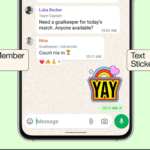
In addition to adding more functionality WhatsApp has pushed out a dozen new capabilities across chats, voice calls, video calls, and channels that make it easier to manage group discussions. One of the most significant features is a new “Online” indication for groups, which indicates how many people are presently using the app in real time. WhatsApp disclosed a number of new features for iOS and Android users on Wednesday. According to Meta’s instant messaging platform, group chats now have a “Online” indicator that informs users of other users who are open for a chat interaction in real time, and tappable reactions make it easier to view everyone’s message reactions and tap to follow up on the same. Additionally, WhatsApp has multiple iOS-specific features, including document scanning on iPhone and pinch-to-zoom in.
In a blog post, WhatsApp shared an outline of its new features. The new “Online” icon, according to Meta Platforms’ instant messaging software, lets users know if other people are online for real-time communication. Users may now select whether to get alerts from mentions, responses, and messages from contacts they have saved, limiting notifications to just highlights.
This feature, which shows the online status of server participants, is one of numerous new features that are comparable to those on rival messaging platforms like Discord. Although it should make it simpler to identify how many people are actively reading the conversation, WhatsApp has not said whether users will be able to manually change their own status indication to indicate whether they are online or offline.
If you find group chat notifications excessive, it will now be simpler to categorize and manage them. To specifically limit alerts for responses, @mentions, and messages from saved contacts, users may choose the new “Notify for” setting and hit “Highlight.” Alternatively, they can choose “All” to get all notifications. Similar to Slack and Discord users, group chat participants may touch on other users’ reactions on messages to add their own.
A number of event updates are also available. One-on-one interactions can also be used to construct an event in addition to groups. In addition to inviting a guest, adding the finish date and time for longer events, and pinning the event in a conversation, the new RSVP option “Maybe” has been added.
The ability to RSVP as “maybe,” invite a guest, and select an end date and time has been added to events. In order to facilitate their visibility, events may now be pinned in group conversations and generated in direct messages.
With this update, WhatsApp introduces tappable reactions, which allow users to see how others are reacting and tap on their preferred response to follow up on it. Also the option to make WhatsApp the default app for calls and messages, as well as an integrated document reader that lets users scan, crop, and save document files without launching a separate app, are two capabilities that are only available to iPhone users. By going to their device settings, tapping on “Default Apps,” and choosing WhatsApp, iPhone users may make the transition. In the meantime, voice message transcripts and video notes (up to 60 seconds) are now available for WhatsApp channels, and administrators can invite others to their channel by simply creating and sharing a QR code that links to it.
Additionally, there are a number of features specific to iPhones: according to WhatsApp, users can scan and send files instantly from their iPhone, removing the need for third-party file scanning apps. Also calls have been improved to be “more reliable and higher quality,” according to WhatsApp, call participants may now pinch to zoom in on a video during a video call to view their own or the recipient’s video in greater detail; and users can now add people to an ongoing 1:1 call directly from a chat thread by tapping the call icon at the top and choosing the Add to call option.
Related Reading
More contextual TechBooky stories selected from tags, categories and article context.
We use cookies to ensure that we give you the best experience on our website. If you continue to use this site we will assume that you are happy with it.