YouTube has rolled out a new feature designed to help people spend less time mindlessly scrolling through Shorts, the platform’s answer to TikTok’s short videos. The company is introducing a daily timer that users can set to limit how much time they spend watching these quick, addictive clips.
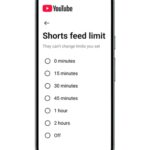
The feature works in a straightforward way. Users can now set a specific time limit for watching Shorts through their account settings in the YouTube mobile app. Once they’ve hit that limit, YouTube will pause the Shorts feed and show a reminder that they’ve reached their daily quota. It’s like setting an alarm to stop yourself from doing something you know you probably shouldn’t be doing for too long.
YouTube Shorts has become incredibly popular since its launch, with the platform reporting more than 70 billion views every single day. That’s a staggering number that shows just how many people have gotten hooked on the short video format. But with that popularity has come growing concerns about how much time people are spending glued to their screens, swiping from one video to the next without even realizing how many minutes or hours have passed.
Anyone who’s used Shorts, TikTok, or Instagram Reels knows exactly how this happens. You open the app thinking you’ll just watch one or two videos, and suddenly you look up and realize an hour has disappeared. The videos are designed to keep you engaged, with each one leading seamlessly into the next. Before you know it, you’ve watched dozens of clips about cooking, funny pets, life hacks, and things you didn’t even know you were interested in.
This phenomenon has a name that many people have become familiar with; doomscrolling. It’s that feeling of being trapped in an endless loop of content, unable to stop yourself from swiping to the next video even when you know you should be doing something else. Studies have shown that excessive use of short video apps can lead to real problems including difficulty concentrating, poor time management, and reduced ability to focus on longer tasks.
YouTube’s new timer feature is an attempt to address these concerns. When users set up their daily limit, they can choose how many hours or minutes they want to allow themselves to spend on Shorts. The system is flexible enough to accommodate different preferences, whether someone wants to limit themselves to fifteen minutes a day or allow for a couple of hours of casual browsing.
Here’s the important part though: the timer isn’t a hard lockout. When the limit is reached, users get a prompt telling them they’ve hit their daily quota, but they can dismiss that reminder and keep scrolling if they choose to. YouTube isn’t forcing anyone to stop watching, they’re just providing a nudge to help people who want to be more mindful about their screen time. It’s like having a friend tap you on the shoulder and ask if you really want to keep watching, but you can still say yes and continue.
The feature also doesn’t completely block access to Shorts across the entire platform. Even after hitting the daily limit, individual Short videos that appear in other parts of YouTube, like the home feed or search results, will still be viewable. The restriction specifically targets the endless scrolling through the dedicated Shorts feed, which is where people tend to lose track of time most easily.
YouTube already offers other tools aimed at helping users manage their viewing habits. The platform has a “Take a Break” reminder that can be set to pause regular videos at intervals of fifteen, thirty, sixty, ninety, or one hundred and eighty minutes. There’s also a bedtime reminder feature that alerts users when it’s time to stop watching and go to sleep based on a schedule they set up. This new Shorts timer joins these existing features as part of YouTube’s digital wellbeing toolkit.
One notable aspect of the current rollout is that parents can’t yet use this feature to control their children’s viewing time. The timer isn’t integrated with YouTube’s parental controls right now, which means kids can still dismiss the prompts and keep watching. However, YouTube has announced that parental control integration is coming later this year. Once that happens, children won’t be able to dismiss the time limit reminders that their parents set, giving families better tools to manage screen time.
The timing of this feature is interesting because YouTube is actually arriving late to this particular solution. Both TikTok and Instagram already have similar time limit features available for their short video feeds. Given how addictive this type of content can be, especially for younger users, many people have been calling for these kinds of controls for years. The fact that YouTube is implementing it now suggests the company recognizes both the growing concerns about screen time and the competitive pressure to provide similar tools to what other platforms offer.
The feature started rolling out to users today, though it may take some time before everyone sees it in their app. These kinds of updates typically happen in waves rather than all at once, so some people might need to wait a few days or even weeks before the new timer option appears in their settings. Additionally, the feature is currently only available on mobile devices. People who watch Shorts on desktop computers won’t have access to this timer and will need to manage their viewing time without any built-in reminders.
For people who have been struggling to control their Shorts viewing habits, this new feature provides a practical tool that’s built right into the app. Rather than needing to download separate screen time management apps or relying purely on willpower, users can now set their intentions directly within YouTube and get reminders when they’ve reached their chosen limit.
The broader trend here is worth noting. More and more people are becoming aware of how much time they spend on social media and video platforms, and they’re actively looking for ways to cut back. App developers are responding to this demand by building in features that help users disconnect rather than keeping them engaged at all costs. It’s a significant shift from the previous approach where platforms focused almost entirely on maximizing watch time and engagement.
Whether this timer feature will actually help people spend less time on Shorts remains to be seen. Since users can dismiss the reminders and keep watching, the effectiveness depends largely on individual willpower and commitment.
Related Reading
More contextual TechBooky stories selected from tags, categories and article context.
We use cookies to ensure that we give you the best experience on our website. If you continue to use this site we will assume that you are happy with it.