• AI Search
  • Cryptocurrency
  • Earnings
  • Enterprise
  • About TechBooky
  • Submit Article
  • Advertise Here
  • Contact Us
TechBooky
  • African
  • AI
  • Metaverse
  • Gadgets
Generic selectors
Exact matches only
Search in title
Search in content
Post Type Selectors
Search in posts
Search in pages
  • African
  • AI
  • Metaverse
  • Gadgets
Generic selectors
Exact matches only
Search in title
Search in content
Post Type Selectors
Search in posts
Search in pages
TechBooky
Generic selectors
Exact matches only
Search in title
Search in content
Post Type Selectors
Search in posts
Search in pages
Home Service news

YouTube Now Lets You Turn the Shorts Feed Off Completely

Paul Balo by Paul Balo
April 16, 2026
in Service news
Share on FacebookShare on Twitter

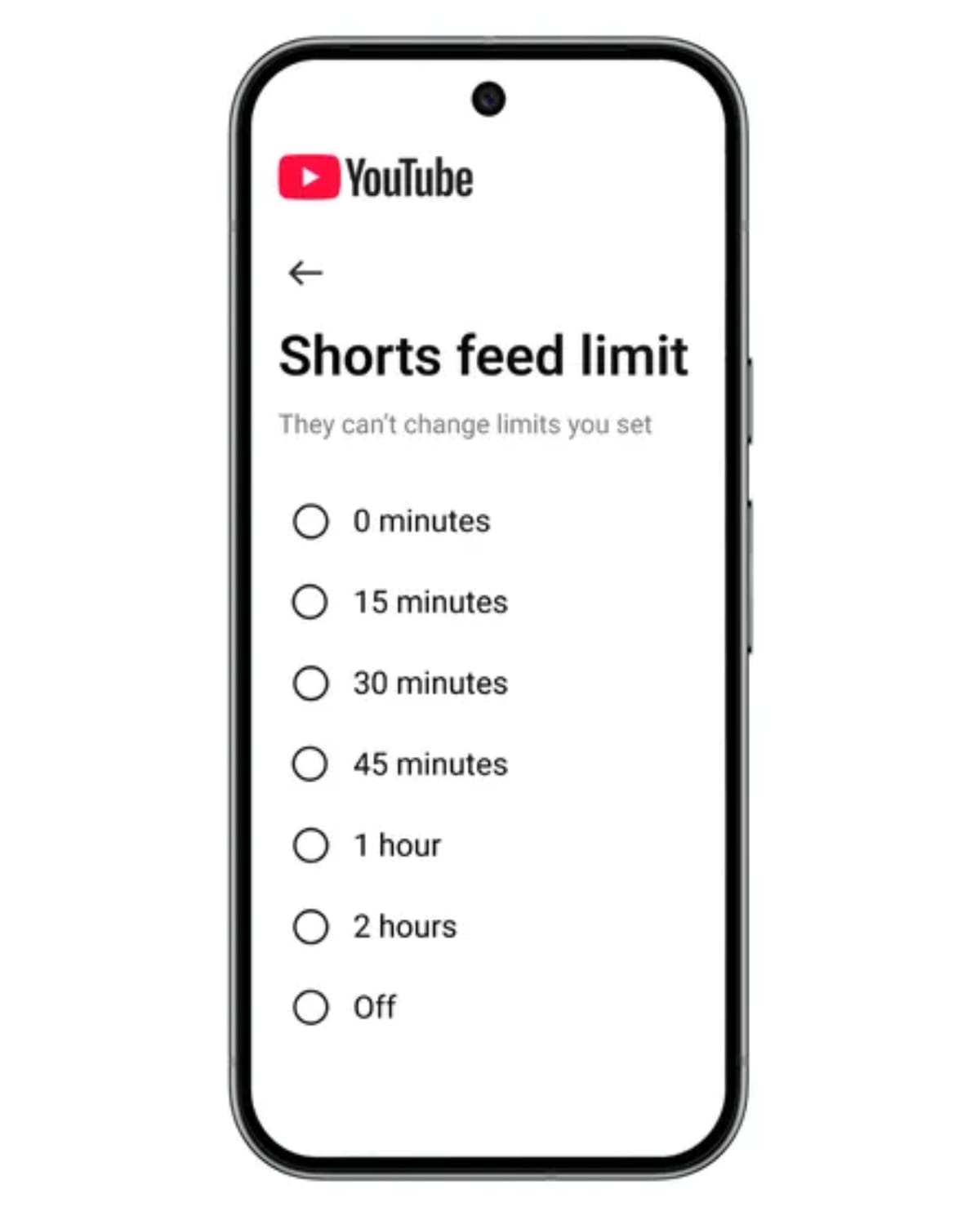
YouTube is giving users more control over how much short-form video they see. Google’s YouTube has rolled out an option to set your Shorts feed limit to zero minutes on mobile, effectively hiding the endless Shorts feed if you don’t want it.

Shorts feed limits first arrived in October last year, but the lowest setting was 15 minutes. After hitting that cap, YouTube would surface a reminder to take a break. Earlier this year, YouTube tied the same feature into its parental controls so guardians could set viewing limits for younger users, and at the time it said a zero-minute option for parents was coming.

That capability is now live for all account types, not just supervised ones. Engadget reports being able to see and activate the zero-minute setting on a regular adult account.

When you set the Shorts feed limit to zero, YouTube effectively pauses the dedicated Shorts scrolling experience. The app may display a message stating that “Scrolling is paused but you may still see individual Shorts,” so it doesn’t completely remove the format from the platform, you can still encounter individual short videos in other parts of the app. You may also need to refresh the YouTube mobile app before the Shorts feed disappears from view.

The new limit sits alongside other duration options under YouTube’s time management controls. If you’d prefer to reduce, rather than eliminate, your Shorts consumption, you can pick from other available limits, up to a maximum of two hours per day.

The Shorts feed limit is available in the YouTube mobile app’s settings:

  • Open the YouTube app on your phone.
  • Go to the Settings page.
  • Tap Time management.
  • Scroll down to the Daily limits section.
  • Select Shorts feed limit and choose 0 minutes to pause the Shorts feed, or pick another time limit up to two hours.

By adding a zero-minute option and extending it beyond parental controls, YouTube is formalising a way for users to curb or completely stop Shorts-style doomscrolling on mobile, without leaving the platform altogether.

Related Posts:

  • youtube-shorts-2-ap24-hero
    YouTube Adds Timer Reminder to Curb Shorts Scrolling
  • YouTube_l
    YouTube Smart TV App Update: What’s New
  • youtube-shorts
    YouTube Starts Rolling Out AI-Generated Avatars for Shorts
  • l38620240919151044
    YouTube Shorts Adds AI Effects and Photo Animation Tools
  • Adobe-Premiere-Mobile-YouTube-Shorts
    YouTube Shorts Now Editable in Adobe Premiere
  • youtube-shorts
    These New YouTube Shorts Changes Makes It Look Even…
  • youtube-logo
    Low-Resolution Glitch Investigation on YouTube Ongoing
  • Shorts-YouTube
    YouTube Launches New AI Tools for Shorts Creators

Discover more from TechBooky

Subscribe to get the latest posts sent to your email.

Tags: service newsyoutubeyoutube shorts
Paul Balo

Paul Balo

Paul Balo is the founder of TechBooky and a highly skilled wireless communications professional with a strong background in cloud computing, offering extensive experience in designing, implementing, and managing wireless communication systems.

BROWSE BY CATEGORIES

Receive top tech news directly in your inbox

subscription from
Loading

Freshly Squeezed

  • Anthropic’s Mythos AI Heads to UK Banks as Cybersecurity Fears Escalate April 16, 2026
  • YouTube Now Lets You Turn the Shorts Feed Off Completely April 16, 2026
  • Adobe Unveils Firefly AI Assistant To Orchestrate Creative Cloud Workflows April 15, 2026
  • Snap Cuts 16% of Workforce as AI Reshapes Company Strategy April 15, 2026
  • Samsung’s 2026 Micro RGB 4K TVs Start at $1,600, Top Out at 85 Inches April 15, 2026
  • Anthropic’s Momentum Puts Fresh Pressure On OpenAI’s Sky‑High Valuation April 15, 2026
  • NDPC Probes Loan Shark Operators On Data Breach Policy April 15, 2026
  • Insolify Introduces Low-Latency AI Payments for Weak Networks April 15, 2026
  • Survey: 43% of AI‑generated Code Changes still Break in Production April 15, 2026
  • Mastodon Announces Plan To Add End-To-End Encryption For DMs April 15, 2026
  • OpenAI Rolls Out GPT-5.4-Cyber with Trusted Access Program to Control Powerful AI April 15, 2026
  • Google Launches Desktop App for Windows with AI Search Built In April 14, 2026

Browse Archives

April 2026
MTWTFSS
 12345
6789101112
13141516171819
20212223242526
27282930 
« Mar    

Quick Links

  • About TechBooky
  • Advertise Here
  • Contact us
  • Submit Article
  • Privacy Policy
Generic selectors
Exact matches only
Search in title
Search in content
Post Type Selectors
Search in posts
Search in pages
  • African
  • Artificial Intelligence
  • Gadgets
  • Metaverse
  • Tips
  • AI Search
  • About TechBooky
  • Advertise Here
  • Submit Article
  • Contact us

© 2025 Designed By TechBooky Elite

Discover more from TechBooky

Subscribe now to keep reading and get access to the full archive.

Continue reading

Chat with TechBooky AI
💬
TechBooky AI ✕
We use cookies to ensure that we give you the best experience on our website. If you continue to use this site we will assume that you are happy with it.