TechBooky AI Assistant
👋 Welcome to TechBooky AI Assistant

I can help with:
🔎 Tech News
🤖 AI Topics
💻 Gadgets
☁️ Cloud
✍️ Guest Posts
📢 Advertising
🔗 Backlinks
📩 Newsletter
  • AI Search
  • Cryptocurrency
  • Earnings
  • Enterprise
  • About TechBooky
  • Submit Article
  • Advertise With TechBooky
  • Contact Us
TechBooky
  • African
  • AI
  • Metaverse
  • Gadgets
Generic selectors
Exact matches only
Search in title
Search in content
Post Type Selectors
Search in posts
Search in pages
  • African
  • AI
  • Metaverse
  • Gadgets
Generic selectors
Exact matches only
Search in title
Search in content
Post Type Selectors
Search in posts
Search in pages
TechBooky
Generic selectors
Exact matches only
Search in title
Search in content
Post Type Selectors
Search in posts
Search in pages
Home Cloud

Google Drive Android Gets New Video Player & Upload Features

Akinola Ajibola by Akinola Ajibola
June 21, 2025
in Cloud, Service news
Share on FacebookShare on Twitter
Share this story

Send it to someone who should read it.

f Facebook X X in LinkedIn wa WhatsApp tg Telegram @ Email
In Brief
  • Google Drive has released two updates to the Android app that update the video player and file uploading functionality.
  • This means that the video player in Google Drive for Android now has more user-friendly playback controls.
  • Additionally, file renaming, folder selection, and more transparent progress tracking have been added to the mobile upload process.

Google Drive has released two updates to the Android app that update the video player and file uploading functionality. This means that the video player in Google Drive for Android now has more user-friendly playback controls. Additionally, file renaming, folder selection, and more transparent progress tracking have been added to the mobile upload process.

Google’s primary storage app with the update now making it simpler to watch videos and submit files is the main goal of the most recent Google Drive for Android improvements.

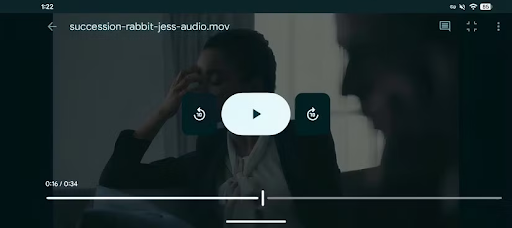
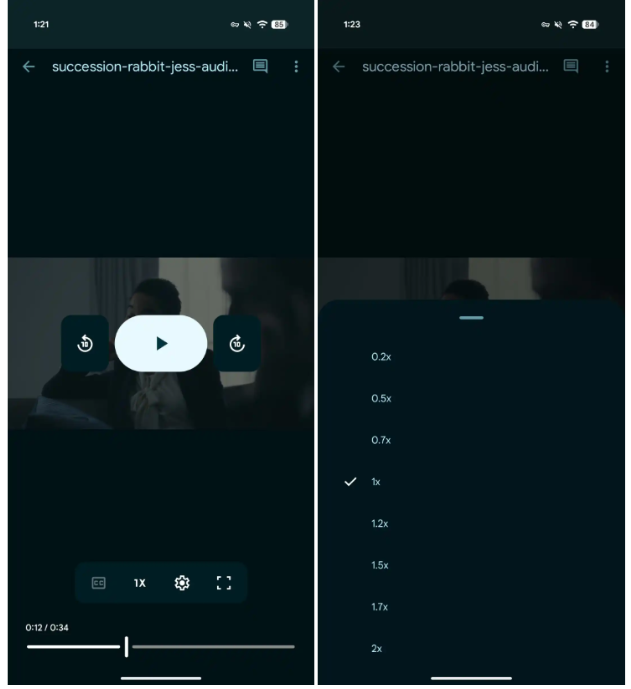
The Playback controls are even now easier to view and use, thanks to the updated design, which places them beneath the video instead of overlaid. It also offers full-screen mode, playback speed, and fast access to captions.


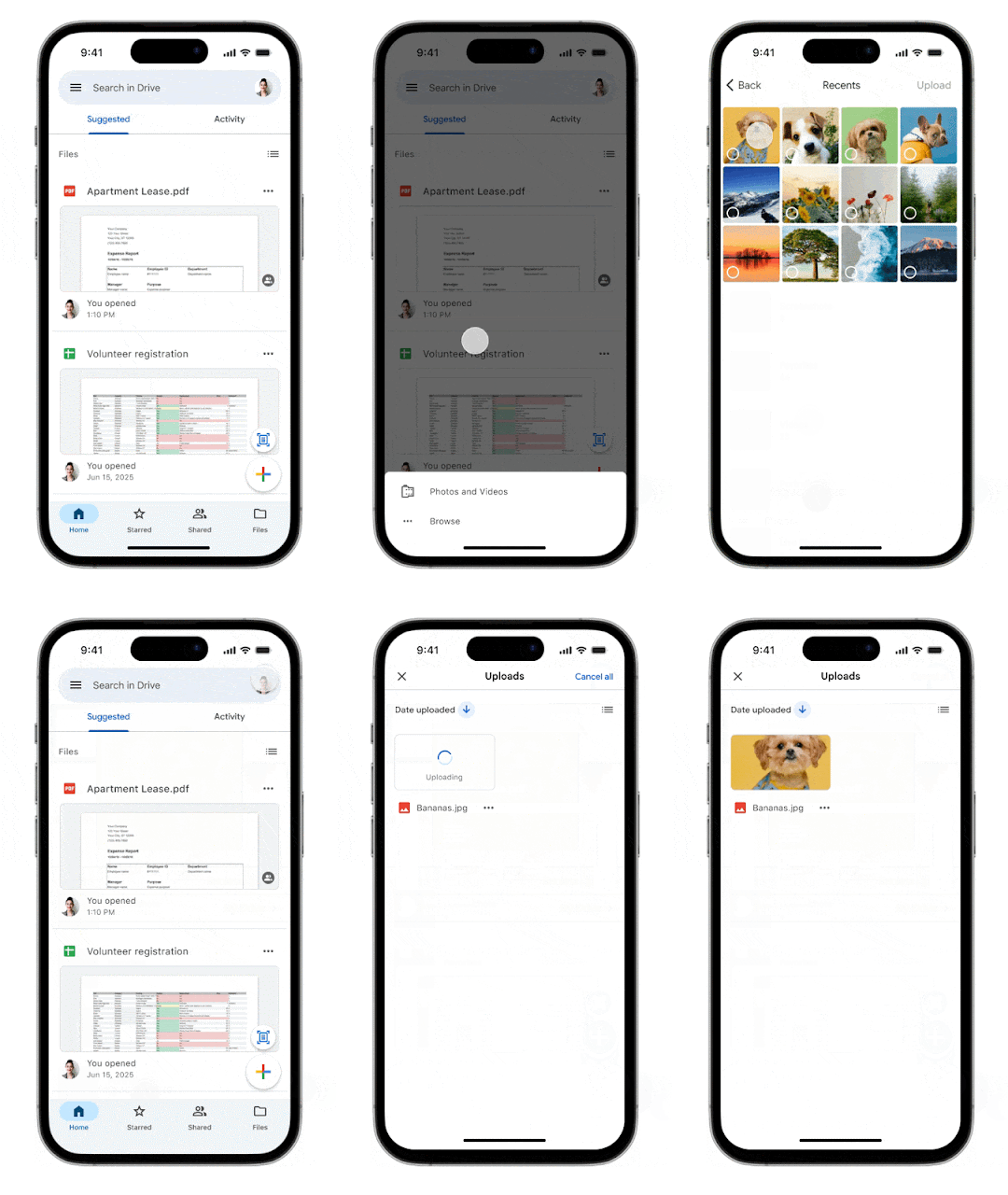
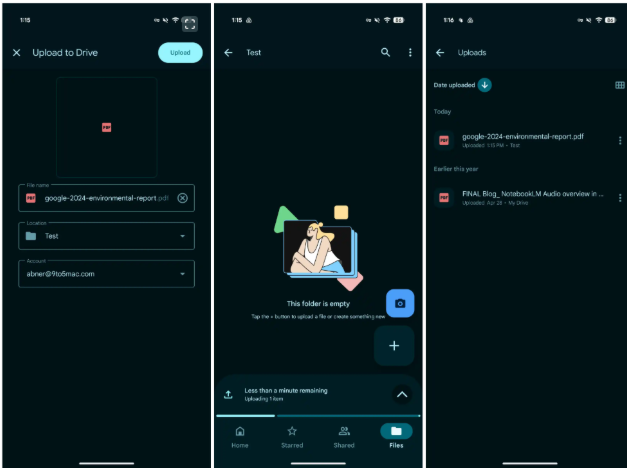
When uploading files, the Google Drive app on iOS and Android now provides “more fine grained controls and proactive status updates.” You can rename the file, modify the folder location, and change the account if you’re signed in to several accounts after choosing what you want to upload on the “initial upload screen.”

Also worth reading
EU Orders Google To Open Android And Search Data To Rival AI Assistants Google Drive’s Document Scanner Gets New Updates Android 17 Is Here and Google Wants Gemini to Run Your Entire Phone Google Rolls Out Media App Switcher For Android Auto Google’s AI Studio Can Now Spin Up Native Android Apps in Minutes Apple Sides With Google in EU Fight Over Opening Android to AI Rivals

This player’s Android version was first seen to us in March, when code from a Drive app deconstruction suggested a redesign. The revised layout wasn’t yet available to users, but it could be manually enabled at the time.

The bottom sheet/progress shows that “tells you how many items are uploading and how long it will take” is then docked above the bottom bar and pushes up the floating action buttons, or FABs. In addition to the standard system notification, that exists. 

The Uploads page, accessible through the navigation drawer as well, can be accessed by tapping the up chevron. “All pending or recently completed uploads” are displayed to you.

Additionally, Google Drive’s mobile upload experience is being updated. A new progress indicator makes it easier to see how much is left, and you can now choose the destination folder and rename files as soon as you hit upload. You can also monitor recently finished and pending uploads using the Upload tab.

Additionally, the “smoother, more modern video player” that was first made available online last year is now available in Google Drive for Android. The timeline scrubber is located at the bottom, along with sizable Material 3 buttons for play/pause and rewind/skip. Controls for captions, looping, fullscreen, and playback speed (0.2-2x) are located above that.

“All Google Workspace customers, Workspace Individual Subscribers, and users with personal Google accounts can access these updates.”

Also both modifications are now completely available to all Google personal accounts and Workspace users.

Related Reading

More contextual TechBooky stories selected from tags, categories and article context.

  • hq720
    Google Drive Updates Video Player Controls
  • How-to-Share-Files-from-Google-Drive
    Google Drive Adds Privacy Screen for Android
  • google-drive-logo-freelogovectors.net_
    Google Drive's Document Scanner Gets New Updates
  • Enhancing video navigation and accessibility with Google Drive video transcripts
    Google Drive Adds Video Caption Viewing and Search
  • chromecast_edited_1765839714
    Apple TV App Update Enables Google Cast on Android
  • l87620240315095304
    Google Moves Android News Online Ahead of I/O
  • VS--2-
    Proton Drive vs Google Drive; Here's what to Know
  • Screen_Shot_2020_08_11_at_8.40.27_AM
    Google Phone Introduces Personalised Profile Cards
Keep Reading Smarter

Search TechBooky with AI

Use TechBooky's AI Search to explore the context behind this story and related coverage across the site.

Try AI Search
More On This Topic
Cloud Service news
Follow TechBooky

Follow TechBooky for more technology stories and newsroom updates.

f Facebook X X in LinkedIn ig Instagram wa WhatsApp

Tags: androidDrivegoogle drive
Akinola Ajibola

Akinola Ajibola

Search TechBooky
Open TechBooky AI Search Try the AI Assistant

BROWSE BY CATEGORIES

Receive top tech news directly in your inbox

subscription from
Loading

Freshly Squeezed

  • Hugging Face Faces Deepfake Safety Questions After AI Forensics Study July 28, 2026
  • Recursive Superintelligence Signs $410M AWS Compute Deal July 28, 2026
  • Apple Upgrade Turns iPhones And Macs Into A Leasing Business July 28, 2026
  • Lyft And Baidu Start London Robotaxi Tests As Europe Race Heats Up July 28, 2026
  • PayPal Raises Profit Outlook As Turnaround Meets Takeover Speculation July 28, 2026
  • Microsoft Launches MAI-Cyber-1-Flash As AI Security Becomes A Model Race July 28, 2026
  • Anthropic Says It Does Not Want An Open-Weight AI Ban, But Still Wants Tough Rules July 28, 2026
  • X Money Launches In The US As Musk Moves X Closer To An Everything App July 28, 2026
  • Snapchat Brings Spotify Listening To Snap Map With Now Playing July 27, 2026
  • Threads Users Can Now DM Meta AI As The Assistant Moves Deeper Into Social Apps July 27, 2026
  • NVIDIA Launches Open Secure AI Alliance To Make Open Models A Cyber Defence Tool July 27, 2026
  • CXMT Surges 470% As China Bets Big On AI Memory Chips July 27, 2026

Browse Archives

July 2026
M T W T F S S
 12345
6789101112
13141516171819
20212223242526
2728293031  
« Jun    

Quick Links

  • About TechBooky
  • Advertise With TechBooky
  • Contact us
  • Submit Article
  • Privacy Policy
Generic selectors
Exact matches only
Search in title
Search in content
Post Type Selectors
Search in posts
Search in pages
  • African
  • Artificial Intelligence
  • Gadgets
  • Metaverse
  • Tips
  • AI Search
  • About TechBooky
  • Advertise With TechBooky
  • Submit Article
  • Contact us

© 2025 Designed By TechBooky Elite

Discover more from TechBooky

Subscribe now to keep reading and get access to the full archive.

Continue reading

We use cookies to ensure that we give you the best experience on our website. If you continue to use this site we will assume that you are happy with it.