TechBooky AI Assistant
👋 Welcome to TechBooky AI Assistant

I can help with:
🔎 Tech News
🤖 AI Topics
💻 Gadgets
☁️ Cloud
✍️ Guest Posts
📢 Advertising
🔗 Backlinks
📩 Newsletter
  • AI Search
  • Cryptocurrency
  • Earnings
  • Enterprise
  • About TechBooky
  • Submit Article
  • Advertise With TechBooky
  • Contact Us
TechBooky
  • African
  • AI
  • Metaverse
  • Gadgets
Generic selectors
Exact matches only
Search in title
Search in content
Post Type Selectors
Search in posts
Search in pages
  • African
  • AI
  • Metaverse
  • Gadgets
Generic selectors
Exact matches only
Search in title
Search in content
Post Type Selectors
Search in posts
Search in pages
TechBooky
Generic selectors
Exact matches only
Search in title
Search in content
Post Type Selectors
Search in posts
Search in pages
Home Service news

Google Messages Adds Snooze and Delete Features

Akinola Ajibola by Akinola Ajibola
June 19, 2025
in Service news
Share on FacebookShare on Twitter
Share this story

Send it to someone who should read it.

f Facebook X X in LinkedIn wa WhatsApp tg Telegram @ Email
In Brief
  • These two features Google Messages’ “Delete for everyone” feature are only available in RCS chats.
  • Rich Communication Services, or RCS chat, is an advanced messaging protocol that offers a more loaded with functions and comprehensive chatting experience than SMS and MMS.
  • Last week, Google had revealed a number of new features for its Messages app, such as the ability to snooze notifications and remove text messages from...

These two features Google Messages’ “Delete for everyone” feature are only available in RCS chats.

Rich Communication Services, or RCS chat, is an advanced messaging protocol that offers a more loaded with functions and comprehensive chatting experience than SMS and MMS.

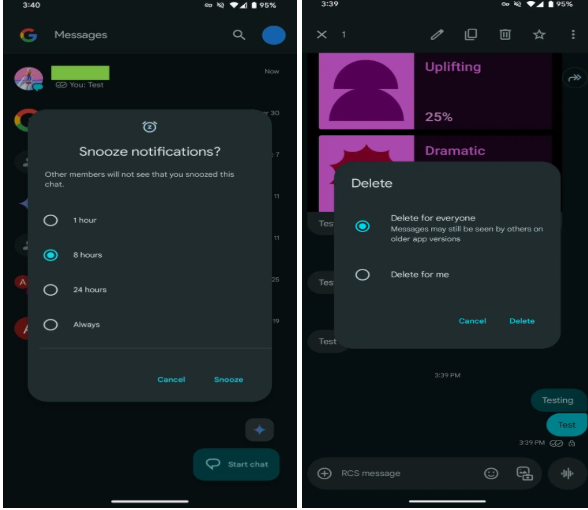
Last week, Google had revealed a number of new features for its Messages app, such as the ability to snooze notifications and remove text messages from RCS chats for all participants. Stable users will now have widespread access to these features. The former allows you to snooze incoming message notifications, as the names imply. In the meanwhile, the latter, like WhatsApp’s current feature, removes texts for all conversation participants. The erased texts might still be visible to users of older versions of the Google Messages app, though.

Google Messages’ “Delete for everyone” feature has been in the works for a few months. The tech giant made the app available to beta customers the following month after it was discovered in the code back in February. The Google Messages app now makes it largely available.

Delete for everyone and Delete for me are now the two options that appear when you long press on a message and then tap the trash button. The former takes it off of the device of both the sender and the recipient, the receiver.

Google has also added the ability to snooze notifications to the Messages app. From the app’s home screen, long pressing on a chat opens a new window with the various time periods displayed. Users have the option to snooze conversational notifications for one hour, eight hours, twenty-four hours, or always.

Also worth reading
Google to Launch ‘Delete for Everyone’ Feature on Messages Google Messages Adds Spam Filter and Content Warnings Google and Airtel Partner to Tackle RCS Spam in India Custom Contacts Comes Back to Google Messages New Features Coming To Snapchat Including Editing Sent Messages WhatsApp Tests Left-Aligned Sidebar for Easier iPad Navigation

The chosen time or date will then show underneath the chat, which will be grayed out. According to Google, other participants won’t know that you’ve turned off chat notifications. To undo snooze, users can redo the instructions.

The tech giant has also revealed personalization for RCS group conversations, allowing users to designate a personalized icon and unique moniker for the chats as part of the June 2025 Google Messages upgrade.

RCS group conversations can be renamed, and the 2×2 circular grid of profile avatars can be changed to a custom icon. You have the option of using Google Illustrations or uploading your own image.

Last but not least, the new chat page (version 20250528_00_RC00) now displays RCS status with a label to the right with a distinct and dynamic colour theming for stable users.

All things considered, we all want to believe that these changes will make Google Messages even more competitive, gradually catching up to other well-known platforms like iMessage. These new features are a step toward making Google Messages more adaptable and user-friendly, whether you’re attempting to recover from an unaware message, temporarily mute a conversation, or add a more personal touch to your group chats.

Related Reading

More contextual TechBooky stories selected from tags, categories and article context.

  • google-messages-1
    Google to Launch 'Delete for Everyone' Feature on Messages
  • google-messages-hero
    Google Messages Lets Users Edit RCS Messages to iPhone
  • @threads-asset-DMs-on-Web-1
    Finally Threads Adds Messaging To The Web
  • 489004786_460534553749625_8815815832330094324_n
    WhatsApp Releases Video Notes, Tappable Reactions,…
  • WhatsApp-Apple-Watch_Header
    WhatsApp Now Available on Apple Watch
  • WA_NOTIFICATION_REMINDERS_FOR_CHAT_MESSAGES_FEATURE_IOS
    WhatsApp for iOS Gets Message Reminder Feature
  • 5f08a4e0-a383-11ef-b9ff-05c3bc6765e0
    New Feature: WhatsApp Now Lets you Store Draft Messages
  • WA_NEW_ADVANCED_CHAT_PRIVACY_FEATURE_MEDIA_AUTO_SAVING_CHAT_INFO_SCREEN_ANDROID
    WhatsApp Tests Privacy Feature on Android to…
Keep Reading Smarter

Search TechBooky with AI

Use TechBooky's AI Search to explore the context behind this story and related coverage across the site.

Try AI Search
More On This Topic
Service news
Follow TechBooky

Follow TechBooky for more technology stories and newsroom updates.

f Facebook X X in LinkedIn ig Instagram wa WhatsApp

Tags: google messagesmessagingnew features
Akinola Ajibola

Akinola Ajibola

Search TechBooky
Open TechBooky AI Search Try the AI Assistant

BROWSE BY CATEGORIES

Receive top tech news directly in your inbox

subscription from
Loading

Freshly Squeezed

  • Hugging Face Faces Deepfake Safety Questions After AI Forensics Study July 28, 2026
  • Recursive Superintelligence Signs $410M AWS Compute Deal July 28, 2026
  • Apple Upgrade Turns iPhones And Macs Into A Leasing Business July 28, 2026
  • Lyft And Baidu Start London Robotaxi Tests As Europe Race Heats Up July 28, 2026
  • PayPal Raises Profit Outlook As Turnaround Meets Takeover Speculation July 28, 2026
  • Microsoft Launches MAI-Cyber-1-Flash As AI Security Becomes A Model Race July 28, 2026
  • Anthropic Says It Does Not Want An Open-Weight AI Ban, But Still Wants Tough Rules July 28, 2026
  • X Money Launches In The US As Musk Moves X Closer To An Everything App July 28, 2026
  • Snapchat Brings Spotify Listening To Snap Map With Now Playing July 27, 2026
  • Threads Users Can Now DM Meta AI As The Assistant Moves Deeper Into Social Apps July 27, 2026
  • NVIDIA Launches Open Secure AI Alliance To Make Open Models A Cyber Defence Tool July 27, 2026
  • CXMT Surges 470% As China Bets Big On AI Memory Chips July 27, 2026

Browse Archives

July 2026
M T W T F S S
 12345
6789101112
13141516171819
20212223242526
2728293031  
« Jun    

Quick Links

  • About TechBooky
  • Advertise With TechBooky
  • Contact us
  • Submit Article
  • Privacy Policy
Generic selectors
Exact matches only
Search in title
Search in content
Post Type Selectors
Search in posts
Search in pages
  • African
  • Artificial Intelligence
  • Gadgets
  • Metaverse
  • Tips
  • AI Search
  • About TechBooky
  • Advertise With TechBooky
  • Submit Article
  • Contact us

© 2025 Designed By TechBooky Elite

Discover more from TechBooky

Subscribe now to keep reading and get access to the full archive.

Continue reading

We use cookies to ensure that we give you the best experience on our website. If you continue to use this site we will assume that you are happy with it.