• AI Search
  • Cryptocurrency
  • Earnings
  • Enterprise
  • About TechBooky
  • Submit Article
  • Advertise Here
  • Contact Us
TechBooky
  • African
  • AI
  • Metaverse
  • Gadgets
Generic selectors
Exact matches only
Search in title
Search in content
Post Type Selectors
Search in posts
Search in pages
  • African
  • AI
  • Metaverse
  • Gadgets
Generic selectors
Exact matches only
Search in title
Search in content
Post Type Selectors
Search in posts
Search in pages
TechBooky
Generic selectors
Exact matches only
Search in title
Search in content
Post Type Selectors
Search in posts
Search in pages
Home Service news

Google Photos Rolls Out Quick-Fix Tools To Subtly Enhance Selfies

Akinola Ajibola by Akinola Ajibola
April 21, 2026
in Service news
Share on FacebookShare on Twitter

Google Photos is most likely everyone’s preferred method for organizing their photos and videos, backing them up to the cloud, and editing them while they are on the road if they use Android. Google’s most recent update aims to give its users the ability to edit their selfies, but it does it in a way that the company consistently refers to as “subtle.”

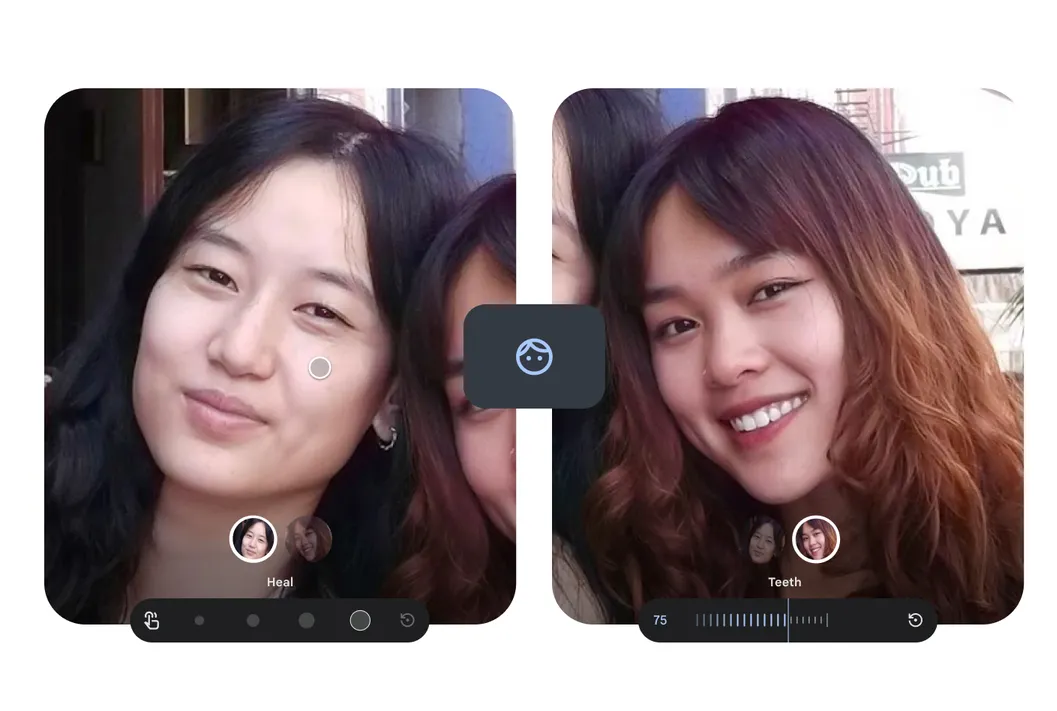
It is a new Touch Up suite of AI-powered face-editing tools for selfies and group portraits that has been formally released by Google Photos. These tools are intended to make subtle, “blink-and-you-miss-it” improvements. These fine-grained features, which were previously limited to Google’s Camera app at the time of capture, are now built right into the primary Google Photos editor for post-capture adjustment. 

Google Photos’ image editor now offers touch-up features that should add “subtle enhancements” to selfies or pictures of their friends, according to an announcement made on the company blog yesterday. Everyone can whiten their teeth, brighten their eyes for a more striking appearance (pun intended), smooth out the texture of their skin, and get rid of imperfections. To use it, pick a face in an image that has been taken, then from the list of tools, choose “heal,” “smooth,” “beneath eyes,” “irises,” “teeth,” “eyebrows,” or “lips.” Users can switch between extremes with each effect’s intensity slider.

The editing suite uses machine learning models with intensity sliders per effect: “Smooth” refines skin texture, “Heal” removes specific blemishes, “Under eyes” reduces dark circles, “Irises” (or “Brighten eyes”) enhances eye luminance, “Teeth” provides quick whitening, and dedicated sliders for “Eyebrows” and “Lips” allow fine-tuning of tones and definition.

Unsurprisingly, Google’s post today uses wording that tries to minimize the possible negative effects of retouching, especially when it comes to its use in industries like fashion and modelling. Additionally, given that Google lost a lawsuit last month regarding YouTube’s involvement in these problems, it is releasing at a time when many parents are angry with how social media affects their teenage children. 

To access the tools, open a photo in Google Photos, tap Edit, go to the Actions tab, select a specific face (the app can detect and edit up to six faces in one group shot, allowing different settings per person), and complete a one-time 16MB download of machine learning models when using the tool for the first time. And adjust the effect level using the slider; dial it down for a natural look or increase it for more visible edits.

Users need Android 9.0 or higher and at least 4GB of RAM to access the new tools.

Related Posts:

  • assets_task_01jryr2pwyfwsagc1sv1n2e5px_img_0
    Introducing Google Photos Integration for Gemini's…
  • Google-Photos-10th-year-celebration-1-1024x576
    Google Photos Marks 10th Anniversary with Editor…
  • GooglePhotos-Art
    Google Photos Gives Users More Control with Undo…
  • l38620240919151044
    YouTube Shorts Adds AI Effects and Photo Animation Tools
  • Ask-Photos
    Google Photos Debut New Feature 'Ask Photos' Using AI
  • GooglePhotos-Art (1)
    Google Photos Adds Image Flip Feature and Desktop Dark Mode
  • ios 27
    iOS 27 Reportedly Adds New Apple Intelligence Photo…
  • Featured-image-for-Google-Photos-conversational-edit-ability
    Google Photos Introduces Meme Creation Feature

Discover more from TechBooky

Subscribe to get the latest posts sent to your email.

Tags: googlegoogle photosgoogle photos touch up
Akinola Ajibola

Akinola Ajibola

BROWSE BY CATEGORIES

Receive top tech news directly in your inbox

subscription from
Loading

Freshly Squeezed

  • Elon Musk Loses Lawsuit Against OpenAI and Sam Altman in Major AI Legal Defeat May 18, 2026
  • Microsoft Confirms Degrading Service Outage On Teams May 18, 2026
  • Google, Amazon, Meta and Microsoft May Add Up To 34 GW Of Compute By 2027 May 18, 2026
  • The New Amazon Alexa+ Can Now Generate Podcast Episodes May 18, 2026
  • Google Begins The Rollout Of Gradient Icon Redesign May 18, 2026
  • Sony Raises PlayStation Plus Prices Again as Gaming Subscriptions Get More Expensive May 18, 2026
  • Samsung Weather App Triggers North Korea Mapping Outrage May 18, 2026
  • Cloudflare Says Anthropic’s Mythos Shows AI Cybersecurity Has Entered a Dangerous New Phase May 18, 2026
  • Apple’s Overhauled Siri Said To Add Auto‑Deleting Chat History As Privacy Pitch May 18, 2026
  • Google Tells Its PostgreSQL Engineers To Rely Heavily On AI May 18, 2026
  • Microsoft Retires Teams’ Together Mode to Simplify Video and Boost Performance May 18, 2026
  • Cybercriminal Twins Arrested After Leaving Microsoft Teams Recording On May 16, 2026

Browse Archives

May 2026
MTWTFSS
 123
45678910
11121314151617
18192021222324
25262728293031
« Apr    

Quick Links

  • About TechBooky
  • Advertise Here
  • Contact us
  • Submit Article
  • Privacy Policy
Generic selectors
Exact matches only
Search in title
Search in content
Post Type Selectors
Search in posts
Search in pages
  • African
  • Artificial Intelligence
  • Gadgets
  • Metaverse
  • Tips
  • AI Search
  • About TechBooky
  • Advertise Here
  • Submit Article
  • Contact us

© 2025 Designed By TechBooky Elite

Discover more from TechBooky

Subscribe now to keep reading and get access to the full archive.

Continue reading

We use cookies to ensure that we give you the best experience on our website. If you continue to use this site we will assume that you are happy with it.