TechBooky AI Assistant
👋 Welcome to TechBooky AI Assistant

I can help with:
🔎 Tech News
🤖 AI Topics
💻 Gadgets
☁️ Cloud
✍️ Guest Posts
📢 Advertising
🔗 Backlinks
📩 Newsletter
  • AI Search
  • Cryptocurrency
  • Earnings
  • Enterprise
  • About TechBooky
  • Submit Article
  • Advertise With TechBooky
  • Contact Us
TechBooky
  • African
  • AI
  • Metaverse
  • Gadgets
Generic selectors
Exact matches only
Search in title
Search in content
Post Type Selectors
Search in posts
Search in pages
  • African
  • AI
  • Metaverse
  • Gadgets
Generic selectors
Exact matches only
Search in title
Search in content
Post Type Selectors
Search in posts
Search in pages
TechBooky
Generic selectors
Exact matches only
Search in title
Search in content
Post Type Selectors
Search in posts
Search in pages
Home Mobile

iOS 26 Public Beta Is Live: How to Install Liquid Glass and Apple Intelligence

Paul Balo by Paul Balo
July 24, 2025
in Mobile, Software
Share on FacebookShare on Twitter
Share this story

Send it to someone who should read it.

f Facebook X X in LinkedIn wa WhatsApp tg Telegram @ Email
In Brief
  •   Apple has finally flipped the switch: the iOS 26 public beta is live and ready for anyone enrolled in the free Apple Beta Software Program...
  • The build mirrors this week’s fourth developer seed (with a minor revision pushed this morning), so public testers are getting Apple’s most polished preview yet.  Once...
  • Back up first—via iCloud or Finder—because early betas can nuke battery life, crash apps and occasionally corrupt data.  So what’s waiting on the other side of...


Apple has finally flipped the switch: the iOS 26 public beta is live and ready for anyone enrolled in the free Apple Beta Software Program to download—bringing the shimmering Liquid Glass redesign and the first consumer wave of Apple Intelligence to millions of iPhones ahead of the autumn release. The build mirrors this week’s fourth developer seed (with a minor revision pushed this morning), so public testers are getting Apple’s most polished preview yet. 

Once you’ve signed in at beta.apple.com, head to Settings → General → Software Update → Beta Updates and select iOS 26 Public Beta; the ~2–3 GB download will appear and install after a reboot. Back up first—via iCloud or Finder—because early betas can nuke battery life, crash apps and occasionally corrupt data. 

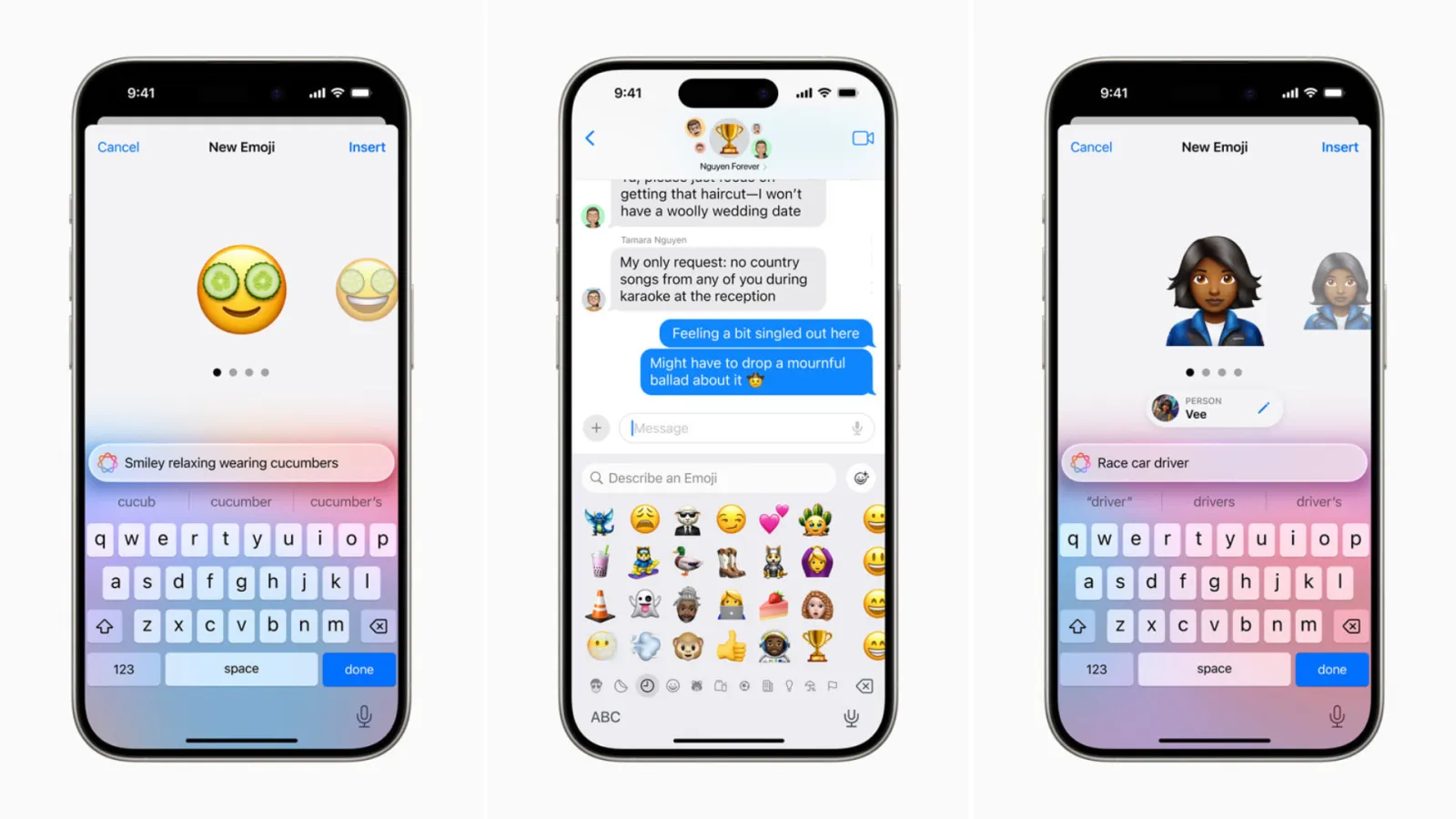
So what’s waiting on the other side of that progress bar? First, Liquid Glass: Apple has draped Control Center, widgets, tab bars and notifications in translucent layers that refract wallpaper colours and ambient light. Developer feedback already pushed tweaks to translucency levels and Control Centre legibility, and those changes carry into today’s public build. Second, Apple Intelligence features begin to surface in daily use. Live Translation pipes near-real-time captions into Phone, FaceTime and Messages calls; Genmoji turns quick prompts into sticker-quality emoji; and AI Notification Summaries regroup alerts with clearly labelled “Summarized by Apple Intelligence” badges and opt-in controls. You’ll also notice a new Games app hub, adaptive power-saving tuned for older batteries, refreshed Safari/Photos layouts and smarter CarPlay widgets. 


Device Eligibility

Also worth reading
iOS 26 Public Beta, 12 Hours In: Liquid Glass Dazzles, Batteries Beg for Mercy Apple Hasn’t Released the iOS 26 Public Beta Yet – How to Get Ready Apple Set to Release iOS 26 Public Beta: Here’s What to Know Apple Releasing iOS 26 Public Beta Wednesday Breaking: Apple Announces iOS 26 ‘Liquid Glass’ with Major Redesign Tesla’s Apple CarPlay Support Delayed Over iOS 26 Issues
  • Public beta supports: iPhone 11 and newer.
  • Full Apple Intelligence suite supported on: iPhone 15 Pro and newer.
  • Dropped from compatibility: iPhone XS/XS Max and XR (A12 Bionic) no longer eligible


How to Install

  • Enrol in the Apple Beta Software Program via beta.apple.com.
  • On your iPhone: Settings → General → Software Update → Beta Updates.
  • Verify your device is backed up (iCloud or Finder) before tapping “Download and Install” .


Beta Caveats

  • Expect bugs, battery quirks and app instability.
  • Notification Summaries, disabled in earlier builds, are back with user toggles and banners noting possible inaccuracies .
  • Some real-time AI features won’t appear on older devices, even if the beta installs.


This is  a rare opportunity to be months ahead of the official autumn launch, you can test Apple’s next-generation interface and AI depths first-hand. Just go to Settings, opt into the public beta, and prepare to explore Liquid Glass, live translations, smarter notifications, a revamped Games hub, and enhanced CarPlay—all while standing watch for bugs that Apple still needs to fix.

Related Reading

More contextual TechBooky stories selected from tags, categories and article context.

  • ios-26-home-screen
    Apple Set to Release iOS 26 Public Beta: Here’s What to Know
  • apple-liquid-glass-interface-iOS26-transparent-designboom-10
    iOS 26 Public Beta Delayed Despite our Earlier Report
  • Screenshot
    Apple Hasn’t Released the iOS 26 Public Beta Yet -…
  • iOS-26-Feature (1)
    Apple Launches iOS 26.2 and iPadOS 26.2 Developer Betas
  • iOS-26-Feature
    Apple Releasing iOS 26 Public Beta Wednesday
  • ios 26.5
    Apple Releases First iOS 26.5 Public Beta with New…
  • apple ios 27
    Apple Opens iOS 27, macOS 27 And watchOS 27 Public…
  • Apple-Liquid-Glass-software-design-has-prompted-legibility-concerns - Copy
    iOS 26 Public Beta, 12 Hours In: Liquid Glass…
Keep Reading Smarter

Search TechBooky with AI

Use TechBooky's AI Search to explore the context behind this story and related coverage across the site.

Try AI Search
More On This Topic
Mobile Software
Follow TechBooky

Follow TechBooky for more technology stories and newsroom updates.

f Facebook X X in LinkedIn ig Instagram wa WhatsApp

Tags: ios 26iOS 26 Betaios 26 pubic beta
Paul Balo

Paul Balo

Paul Balo is the founder of TechBooky and a highly skilled wireless communications professional with a strong background in cloud computing, offering extensive experience in designing, implementing, and managing wireless communication systems.

Search TechBooky
Open TechBooky AI Search Try the AI Assistant

BROWSE BY CATEGORIES

Receive top tech news directly in your inbox

subscription from
Loading

Freshly Squeezed

  • Hugging Face Faces Deepfake Safety Questions After AI Forensics Study July 28, 2026
  • Recursive Superintelligence Signs $410M AWS Compute Deal July 28, 2026
  • Apple Upgrade Turns iPhones And Macs Into A Leasing Business July 28, 2026
  • Lyft And Baidu Start London Robotaxi Tests As Europe Race Heats Up July 28, 2026
  • PayPal Raises Profit Outlook As Turnaround Meets Takeover Speculation July 28, 2026
  • Microsoft Launches MAI-Cyber-1-Flash As AI Security Becomes A Model Race July 28, 2026
  • Anthropic Says It Does Not Want An Open-Weight AI Ban, But Still Wants Tough Rules July 28, 2026
  • X Money Launches In The US As Musk Moves X Closer To An Everything App July 28, 2026
  • Snapchat Brings Spotify Listening To Snap Map With Now Playing July 27, 2026
  • Threads Users Can Now DM Meta AI As The Assistant Moves Deeper Into Social Apps July 27, 2026
  • NVIDIA Launches Open Secure AI Alliance To Make Open Models A Cyber Defence Tool July 27, 2026
  • CXMT Surges 470% As China Bets Big On AI Memory Chips July 27, 2026

Browse Archives

July 2026
M T W T F S S
 12345
6789101112
13141516171819
20212223242526
2728293031  
« Jun    

Quick Links

  • About TechBooky
  • Advertise With TechBooky
  • Contact us
  • Submit Article
  • Privacy Policy
Generic selectors
Exact matches only
Search in title
Search in content
Post Type Selectors
Search in posts
Search in pages
  • African
  • Artificial Intelligence
  • Gadgets
  • Metaverse
  • Tips
  • AI Search
  • About TechBooky
  • Advertise With TechBooky
  • Submit Article
  • Contact us

© 2025 Designed By TechBooky Elite

Discover more from TechBooky

Subscribe now to keep reading and get access to the full archive.

Continue reading

We use cookies to ensure that we give you the best experience on our website. If you continue to use this site we will assume that you are happy with it.