• AI Search
  • Cryptocurrency
  • Earnings
  • Enterprise
  • About TechBooky
  • Submit Article
  • Advertise Here
  • Contact Us
TechBooky
  • African
  • AI
  • Metaverse
  • Gadgets
Generic selectors
Exact matches only
Search in title
Search in content
Post Type Selectors
Search in posts
Search in pages
  • African
  • AI
  • Metaverse
  • Gadgets
Generic selectors
Exact matches only
Search in title
Search in content
Post Type Selectors
Search in posts
Search in pages
TechBooky
Generic selectors
Exact matches only
Search in title
Search in content
Post Type Selectors
Search in posts
Search in pages
Home Artificial Intelligence

Google Chrome’s AI Mode Now Handles Tabs More Like a Human Assistant

TechBooky by TechBooky
April 17, 2026
in Artificial Intelligence, Internet
Share on FacebookShare on Twitter

Google is rolling out a new update to Chrome’s AI Mode that’s designed to make juggling tabs less painful and more contextual. The features, launching first for users in the US, help the built-in chatbot understand and work with whatever you already have open in your browser.

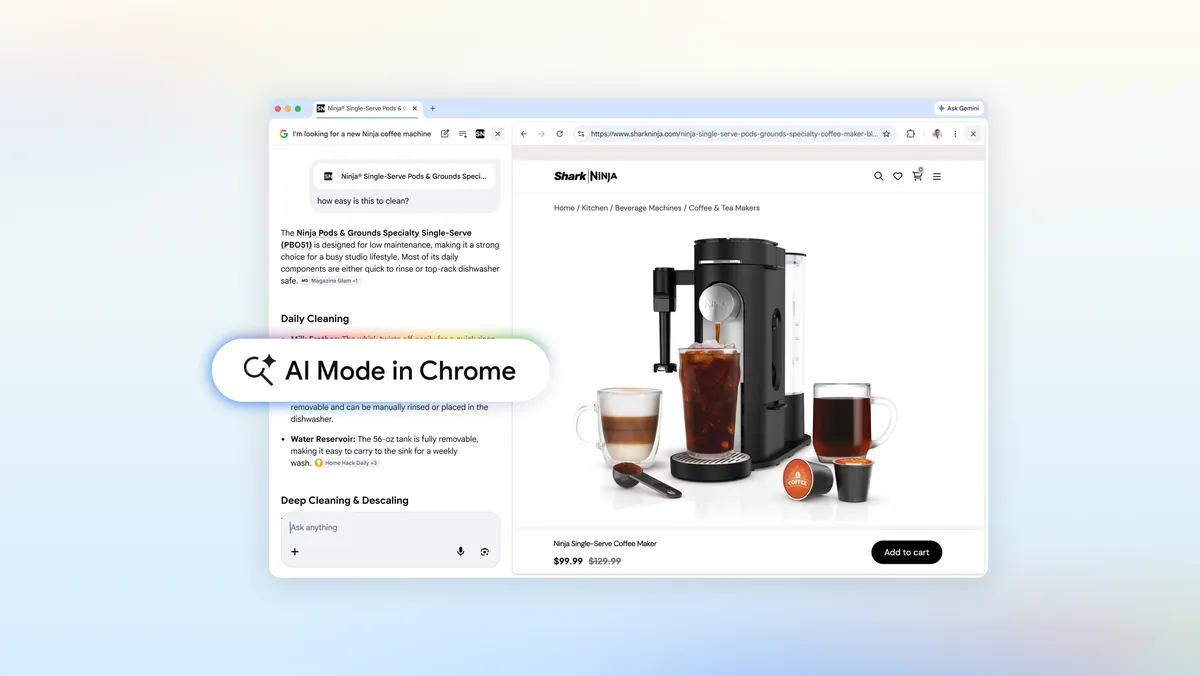
AI Mode in Chrome for desktop will now open a side-by-side view when you click a link from the chatbot. Instead of shuttling between a chat window and a full-page website, you’ll see the webpage and the AI panel together. Google says that connection lets AI Mode keep track of the search that led you there, and use that context while you keep browsing.

In practice, this means you can ask follow-up questions without carefully repeating product names or page details. One example Google gives is shopping for a coffee maker. After AI Mode finds a few models, you can click through to a manufacturer’s page and then ask things like “How easy is this to clean?” without naming the specific machine again. The expanded context window allows the chatbot to understand what you’re referring to based on the page and prior results.

The update goes beyond links surfaced directly by AI Mode. If you already have one tab or a whole set of tabs open and want the chatbot to factor those into a new query, you can now do that from Chrome’s updated Plus menu. Google has added a new option there that tells AI Mode to look at your existing tab or tab group as part of its response.

https://tbwpfiles.s3.eu-west-2.amazonaws.com/wp-content/uploads/2026/04/17131651/Chrome_MobileHiking_disclaimer_16x9.mp4

From the same Plus menu, you can also ask AI Mode to consider other types of content alongside your tabs, including images and PDFs. That effectively turns the chatbot into a single place where you can reference what you’re reading, what you’ve saved and files you’re reviewing, instead of copying text or constantly switching views.

Google says that in its own testing, this tighter integration with tabs led to less tab switching and made it easier for people to stay focused. With the AI panel anchored next to the webpage and aware of surrounding context, users didn’t have to bounce around as much to get answers or run comparisons.

Mike Torres, vice president of product for Chrome, frames the change as part of a broader effort to bring practical AI features directly into the browser. Rather than treating AI Mode as a detached chatbot, these updates aim to blend it into everyday browsing tasks like research, shopping and document review.

The new tab-aware capabilities are available now to Chrome users in the US, with Google planning to bring the update to more regions. The company has not shared specific international timelines, but says the features will be coming to “more places around the world” soon.

Related Posts:

  • Blog_Header_Final.width-1200.format-webp
    Chrome Gets Vertical Tabs as Google Turns the…
  • 1650037494_Download-Google-Chrome-Free-PC-Mac
    Google Chrome Adds Advanced Picture-In-Picture Feature
  • ai-mode-hero-image.width-1300 (1)
    Google Experiments with AI Mode for Chrome Browser
  • 1200x630wa (1)
    Chrome Update Brings Improved Desktop Mode on Android
  • Microsoft-Edge-browser-gains-Copilot-Mode-Integrated-AI-naviagtes-searches-and-soon-shops-for-you
    Edge Gets New Copilot Mode Feature Making it an AI Browser
  • Google-Search-AI-Mode-cover-1
    Google Search’s AI Mode Coming to Android Tablets
  • cf121196-1-CHATGPT
    ChatGPT Launches Desktop Apps with Voice Mode
  • aaaoriginal
    Google’s $5 Billion 'Incognito Mode' Tracking…

Discover more from TechBooky

Subscribe to get the latest posts sent to your email.

Tags: ai modechrome ai modegooglegoogle ai mode
TechBooky

TechBooky

BROWSE BY CATEGORIES

Receive top tech news directly in your inbox

subscription from
Loading

Freshly Squeezed

  • OpenAI Unveils GPT-Rosalind, Aiming at Drug Discovery and Genomics April 17, 2026
  • Google Chrome’s AI Mode Now Handles Tabs More Like a Human Assistant April 17, 2026
  • Anthropic Launches Claude Opus 4.7 as Safer Alternative to Mythos AI April 16, 2026
  • Bluesky Seemed To Be Down For Some Time Today April 16, 2026
  • Lagos Commissioner Gives 21-Weeks Delivery Time Frame On Obalende MTN Yello Park Project April 16, 2026
  • Google Brings a Native Gemini App to macOS, With Deep Screen Access April 16, 2026
  • CAC Experiences Data Breach, Users Advised To Reset Login Credentials April 16, 2026
  • Opera adds Browser Connector for integrating AI chatbots April 16, 2026
  • Anthropic’s Mythos AI Heads to UK Banks as Cybersecurity Fears Escalate April 16, 2026
  • YouTube Now Lets You Turn the Shorts Feed Off Completely April 16, 2026
  • Adobe Unveils Firefly AI Assistant To Orchestrate Creative Cloud Workflows April 15, 2026
  • Snap Cuts 16% of Workforce as AI Reshapes Company Strategy April 15, 2026

Browse Archives

April 2026
MTWTFSS
 12345
6789101112
13141516171819
20212223242526
27282930 
« Mar    

Quick Links

  • About TechBooky
  • Advertise Here
  • Contact us
  • Submit Article
  • Privacy Policy
Generic selectors
Exact matches only
Search in title
Search in content
Post Type Selectors
Search in posts
Search in pages
  • African
  • Artificial Intelligence
  • Gadgets
  • Metaverse
  • Tips
  • AI Search
  • About TechBooky
  • Advertise Here
  • Submit Article
  • Contact us

© 2025 Designed By TechBooky Elite

Discover more from TechBooky

Subscribe now to keep reading and get access to the full archive.

Continue reading

Chat with TechBooky AI
💬
TechBooky AI ✕
We use cookies to ensure that we give you the best experience on our website. If you continue to use this site we will assume that you are happy with it.