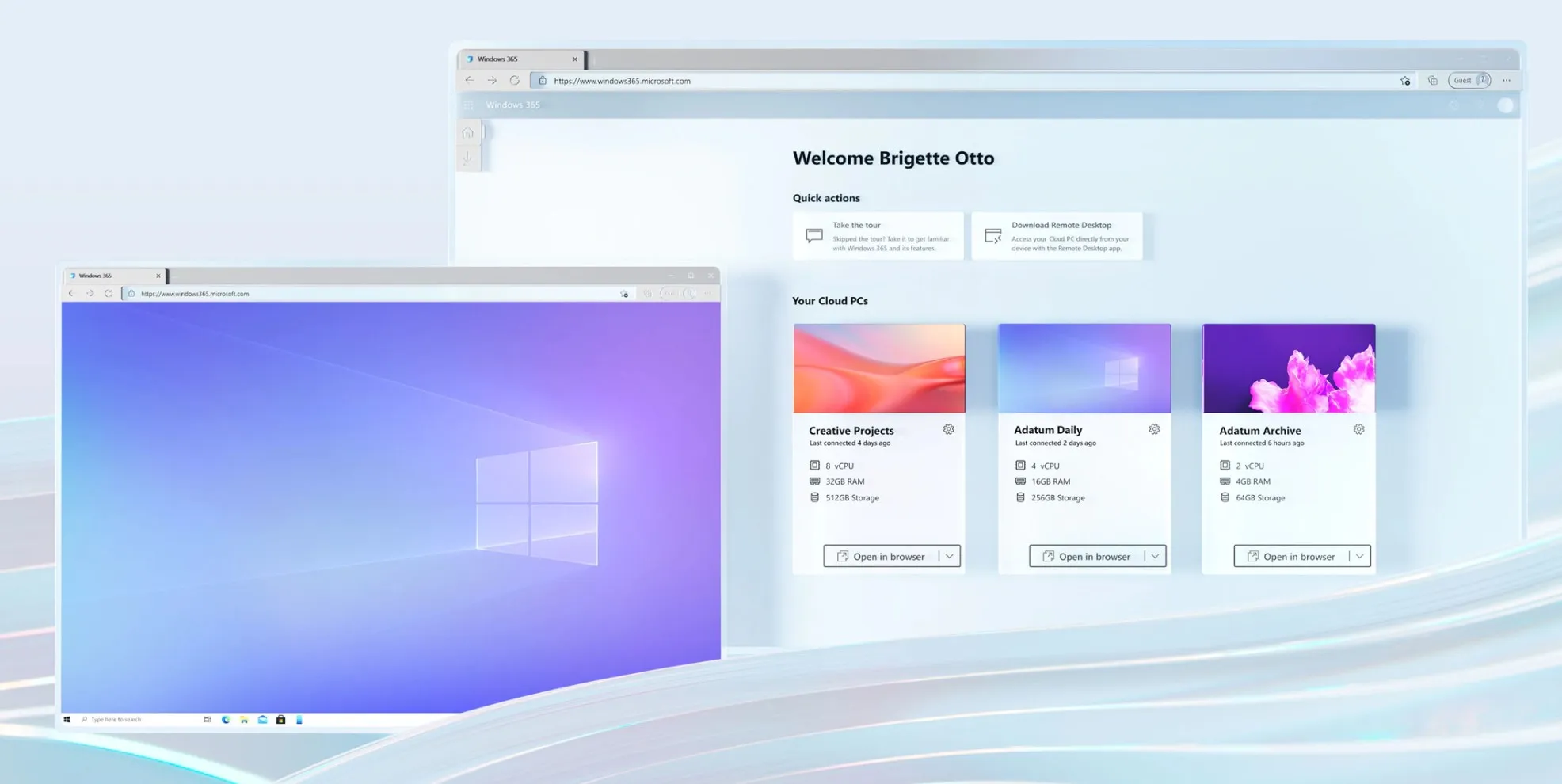
Microsoft has said that the public can now preview the Windows 365 Cloud Apps. This eliminates the need to allocate Cloud PCs to each user by enabling IT managers to stream certain Windows apps from the cloud.
The primary goal is to assist organisations in efficiently simplifying their operating resources. According to a blog post by Microsoft’s Serena Zheng, “Windows 365 Cloud Apps allow administrators to give users access to specific apps delivered from the cloud instead of a full Cloud PC,” making them perfect for businesses looking to streamline app delivery, cut costs, and modernise virtual desktop infrastructures (VDI) environments.
Remote and hybrid workers who need to work in safe software environments can benefit from Windows 365, a very helpful Microsoft solution that makes virtualised PCs housed in the cloud accessible. Microsoft has recently revealed a significant update to this service, which it keeps improving.
Multiple users can access apps separately with a single Cloud PC license, and Cloud Apps can operate in shared mode on Windows 365 Frontline. This eliminates the requirement to give every user a complete desktop environment. By using this paradigm, Microsoft hopes to enhance the operations of workforces in sectors like government, retail, and healthcare that have varying or changing access needs without overprovisioning them.
Customers of Windows 365 can now grant access to specific Cloud Apps, including as Word, Outlook, OneDrive, Edge, and PowerPoint, without having to grant access to an entire Cloud PC. Microsoft started conducting private testing of this functionality in June, and it is currently going into public preview. According to the corporation, this will help businesses streamline the delivery of specialised apps, modernise their virtual desktop infrastructure (VDI), and cut down on administrative burdens.
However, one needs to remember that Windows 365 Cloud Apps run in shared mode under the Frontline Cloud PCs licence. With this specific license, shift workers can access Cloud PCs, and as long as only one session is active at a time, an unlimited number of users can access a single Cloud PC. Microsoft highlights that because it supports task-based workers, the Frontline license is a great option for Cloud Apps.
Customers of Windows 365 can access Cloud Apps via the Windows App, which has recently undergone some improvements. Customers’ selection will be immediately filtered to Windows 365 Cloud Apps when they access the app’s Apps page. Customers should find this new method of app access to be far more versatile and handy than using complete desktop PCs.
The automatic launch of OneDrive and a new filter in the Windows App interface to make it easier for users to locate cloud-delivered programs are two enhancements made to the user experience since the private preview. Administratively, there are still restrictions: in order for custom line-of-business apps to be provided as Cloud Apps, custom images must presently be produced. With deeper integration with Intune and Autopilot operations, Microsoft has stated that it intends to simplify this process through Intune, enabling IT to publish custom apps as Cloud Apps more directly. Microsoft Intune handles IT management duties, while Microsoft Entra ID controls identity and access.
Previously, when deploying cloud hardware for their employees, Windows 365 clients would make bespoke images with just the necessary line-of-business (LOB) software, but this was a laborious procedure. This should undoubtedly be aided by Cloud Apps’ public preview availability. In order to enable the publication of Intune Apps as Cloud Apps, Microsoft will endeavour to make Intune the “single pane of glass for app deployment” in the future. Although Windows 365 Cloud Apps’ wide availability has not yet been announced, Microsoft is optimistic about the platform’s future.
A simplified alternative to full virtual desktop environments for delivering apps is presented by the Cloud Apps preview. This concept might make it easier for IT teams to distribute apps, minimise the need for infrastructure, and make administering traditional PCs less complicated. However, some people still find it difficult to install commercial applications because of the current demand for bespoke images, particularly in the lack of more extensive image management functionality. Additionally, the shared mode setting restricts simultaneous usage, which could not meet the requirements of every organisation.
To test the public preview, organisations must have Windows 365 Frontline licenses and Cloud Apps set up to run in shared mode. Go to the Microsoft website here for additional information on how to get started.
Related Reading
More contextual TechBooky stories selected from tags, categories and article context.
We use cookies to ensure that we give you the best experience on our website. If you continue to use this site we will assume that you are happy with it.