• AI Search
  • Cryptocurrency
  • Earnings
  • Enterprise
  • About TechBooky
  • Submit Article
  • Advertise Here
  • Contact Us
TechBooky
  • African
  • AI
  • Metaverse
  • Gadgets
Generic selectors
Exact matches only
Search in title
Search in content
Post Type Selectors
Search in posts
Search in pages
  • African
  • AI
  • Metaverse
  • Gadgets
Generic selectors
Exact matches only
Search in title
Search in content
Post Type Selectors
Search in posts
Search in pages
TechBooky
Generic selectors
Exact matches only
Search in title
Search in content
Post Type Selectors
Search in posts
Search in pages
Home Software

Google Rolls Out Media App Switcher For Android Auto

Akinola Ajibola by Akinola Ajibola
May 29, 2026
in Software, Transport
Share on FacebookShare on Twitter

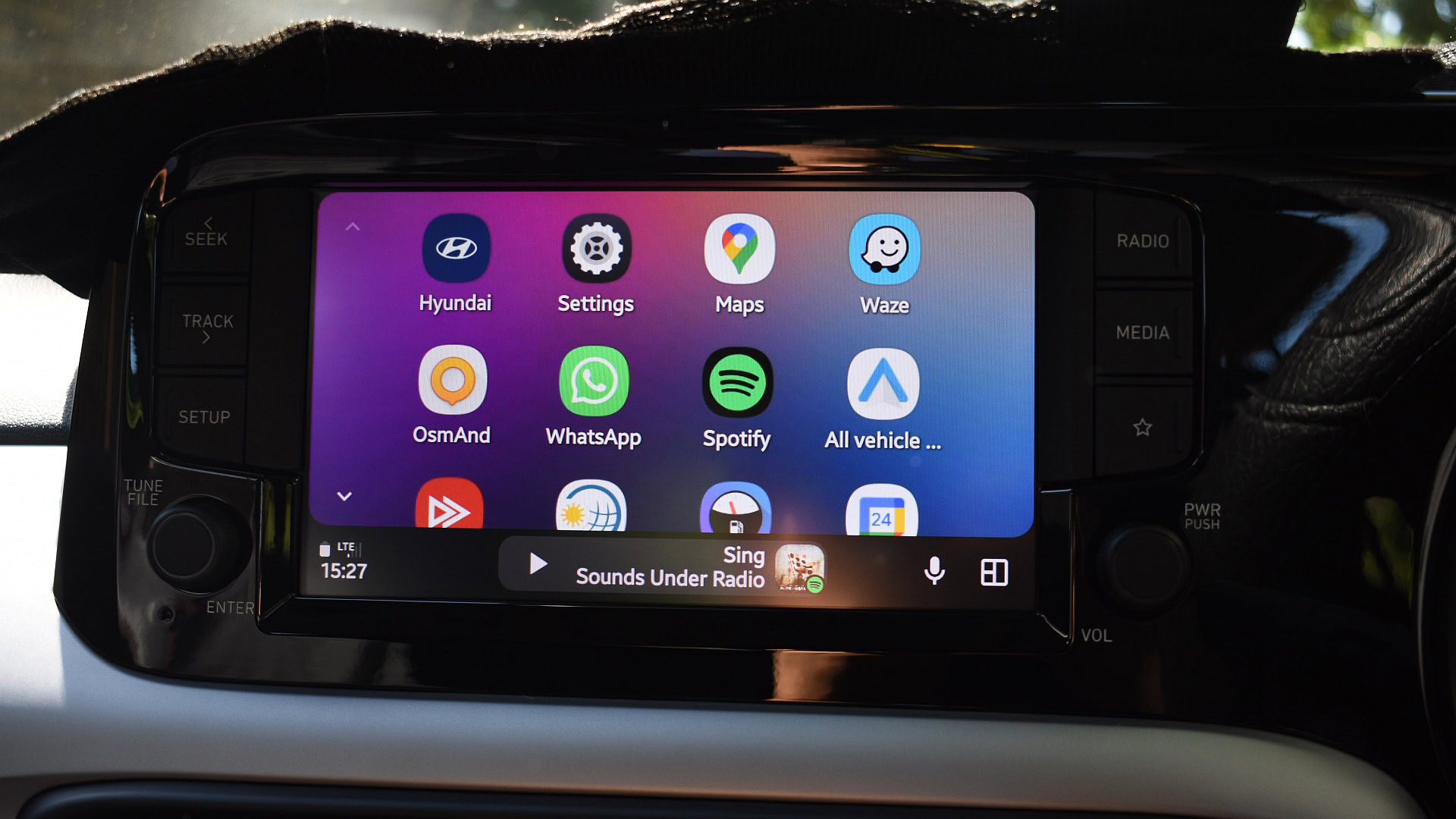
Version 17.0.162144 Android Auto beta users are reporting a new helpful feature that lets them quickly swap between current media apps. The accessible media apps that are loaded on users’ devices can be switched between with only a swipe.

On the Android Auto Dashboard, Google is formally introducing support for multiple swipeable media cards. This much-awaited quality-of-life feature functions as an instantaneous media app switcher. It removes the annoying necessity of manually closing one program, navigating menus, and opening another while operating a vehicle.

Shortly after Google made the media app switcher in Android 17 QPR1 Beta 3 more user-friendly and obvious, the capability was removed. This is now possible with Android Auto as well.

As of this moment, stable Android Auto does not enable media app switching at all; instead, you must manually open the desired app and press play for it to show up on the home screen. Additionally, there is no easy method to return to the prior media app.

It will take some time until the feature makes its way to the stable channel because it is currently only available on the Android Auto beta channel. However, it doesn’t seem like it will take long.

How the new Android Auto works with the update enhances the split-screen Coolwalk layout by introducing multi-session backgrounding, a swipe-to-switch gesture for cycling through active audio apps, and a seamless media card that dynamically updates metadata and controls for the foreground app.

It was first rolled out and spotted in code in October 2025, however the feature is now rolling out to users on Android Auto Beta Version 17.0.162144, and while currently limited to the beta channel, its smooth implementation points to a stable release for all users via the Google Play Store in the coming weeks.

Related Posts:

  • WA_AUTOMATICALLY_DOWNLOADED_CHAT_IMAGE_PHOTO_VIDEO_QUALITY_FEATURE_ANDROID
    WhatsApp Tests Auto-Download Quality Settings on Android
  • WA_AUTO_DOWNLOAD_QUALITY_SETTINGS_FOR_DOWNLOADED_PHOTOS_VIDEOS_MEDIA_FEATURE_ANDROID
    WhatsApp Adds Auto-Download Quality Control
  • material-you-google-account-switcher-before-after
    Android's Google Account Switcher Gets a Fullscreen…
  • WA_VIEW_ONCE_PHOTOS_VIDEOS_VOICE_MESSAGES_LINKED_DEVICES_ANDROID
    WhatsApp Tests View-Once Media Support for Linked Devices
  • WA_STICKER_REACTION_TRAY_FEATURE_ANDROID
    WhatsApp Tests Messages and Media Sticker Reactions
  • WA_DOCUMENT_SCANNING_WITH_CAMERA_FEATURE_ANDROID
    WhatsApp Adds Document Scanning Feature for Android
  • WA_NEW_ADVANCED_CHAT_PRIVACY_FEATURE_MEDIA_AUTO_SAVING_CHAT_INFO_SCREEN_ANDROID
    WhatsApp Tests Privacy Feature on Android to…
  • whatsapp_writing_assistant_wabetainfo_1755148883081
    WhatsApp Tests Auto-Write Feature in Android Beta

Discover more from TechBooky

Subscribe to get the latest posts sent to your email.

Tags: androidandroid autogoogle
Akinola Ajibola

Akinola Ajibola

Quick Links

  • About TechBooky
  • Advertise Here
  • Contact us
  • Submit Article
  • Privacy Policy
Generic selectors
Exact matches only
Search in title
Search in content
Post Type Selectors
Search in posts
Search in pages
  • African
  • Artificial Intelligence
  • Gadgets
  • Metaverse
  • Tips
  • AI Search
  • About TechBooky
  • Advertise Here
  • Submit Article
  • Contact us

© 2025 Designed By TechBooky Elite

Discover more from TechBooky

Subscribe now to keep reading and get access to the full archive.

Continue reading

We use cookies to ensure that we give you the best experience on our website. If you continue to use this site we will assume that you are happy with it.