Are you trying to find an AI that can investigate, summarise, and respond to inquiries regarding your current webpage? You may wish to test Microsoft’s Copilot Vision function.
The formal launch of Copilot Vision for all Edge users was announced by Microsoft AI CEO Mustafa Suleyman in a Bluesky article on Wednesday, last week. Copilot Vision, which was first released as an experimental feature in October of last year, was made available to all Copilot Pro subscribers as a preview in December. Any Edge user with a Microsoft account may now utilize the functionality for free.
Microsoft declared that all users of the Microsoft Edge browser will now have access to Copilot Vision. Initially introduced by the firm in December 2024, the computer vision-enabled artificial intelligence (AI) capability has only been accessible to Copilot Pro users thus far. The software giant from Redmond is now making the AI capability available to all Edge browser users. The AI chatbot can perceive web page content using Copilot Vision and help the user with a variety of activities.
Microsoft AI CEO Mustafa Suleyman said in a post on X (previously Twitter) that Copilot Vision would now be available to all customers, regardless of whether they have a paid Copilot subscription or not. As you browse the web, it will think aloud with you. No more copying, over-explaining, or having trouble putting ideas into words,” Suleyman declared.
Copilot Vision is essentially a real-time computer vision function, much as the screen-sharing tool in Gemini Live. The Edge browser’s web pages and content are visible to the AI chatbot, which may process them in real time along with user prompts. Instead of typing what they wish to say, users may use the voice mode option.
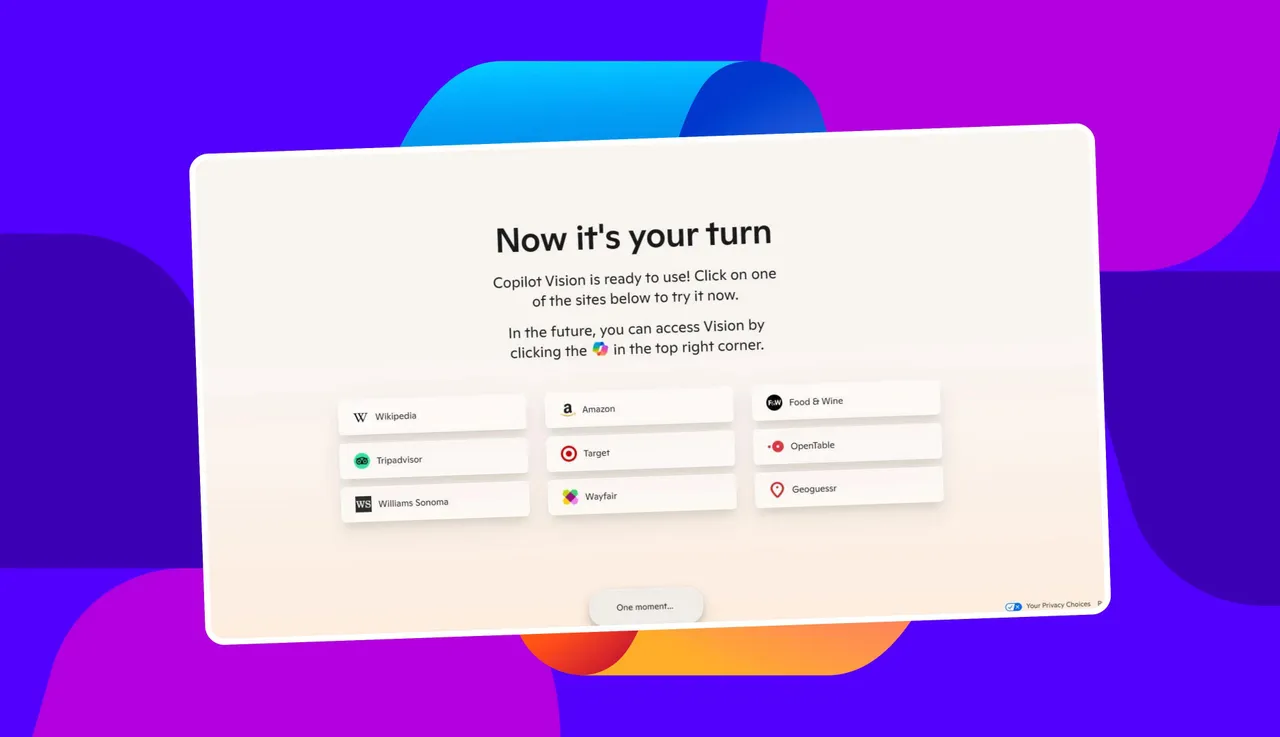
Because some users might be concerned about their privacy and data security, Microsoft made Copilot Vision an optional function. To opt in, users can access this url in the Edge internet browser and then follow the steps. Vision mode may be accessed by tapping the microphone symbol located in the Copilot sidebar. A floating bar with a text box and a microphone button will appear in Copilot Vision.
Copilot Vision can benefit users in several ways, according to Suleyman. It has the ability to read several reviews and provide the user with a summary. For instance, it can identify if a sofa on a shopping website is “roll arm” or “mid century modern.” It can even characterize visually complex products. By using natural language descriptions to discover the appropriate items, it may also assist users with their purchasing.
“Copilot Vision is available now, at no cost, now on Edge,” Suleyman added in his post. “It can practically see whatever you view on display (if you opt in). Quite remarkable! As you browse the web, it will think aloud with you. No more copying and pasting, over-explaining, or having trouble putting ideas into words.
Microsoft had stated at launch that customers would have complete discretion over when to switch it on and off, even after opting in. When off, Copilot Vision is unable to view the user’s screen. Furthermore, the business asserts that at the conclusion of each session, all discussion data including user prompts, photos, and web page content—will be erased. Nonetheless, Copilot’s answers are recorded and used to enhance the business’s security measures.
Using AI, the tool analyses and examines the current web page in Edge. After that, it might summarize the data or tell you what it observes. Additionally, you may submit suggestions and ask questions regarding the content of the website.
For instance, you might ask Copilot to suggest the ideal purchase for you based on your individual requirements and interests once you access a page on Amazon that features a variety of options. You may ask Copilot to walk you through the processes while you peruse a culinary page with an enticing dish. You might go to a job advertising website and ask Copilot for tips on how to write a cover letter that is appropriate for a particular role.
Microsoft claims that Copilot Vision works with the majority of websites, with the exception of those that contain offensive or dangerous information. Furthermore, a restricted or login-protected website cannot be scanned by it. Copilot will show a greyed-out symbol and crossed eyeglasses and won’t talk about the page’s content if you visit an unsupported website.
Your queries, together with any pictures or page content, are not tracked or retained in order to meet privacy concerns. In order for Microsoft to keep an eye out for potentially dangerous interactions, only Copilot’s replies are recorded. All data is erased at the conclusion of the session.
You must be logged into Edge using a Microsoft account in order to test Copilot Vision. Click this link for Copilot Vision in Edge, then follow the instructions to turn on the function. Click the microphone button in the Copilot sidebar. You will be asked to accept the option to browse using Copilot Vision the first time you do this. Once you click Accept, you may proceed.
Now, open the webpage you wish to have described. Click the microphone symbol in the Copilot sidebar, and then choose the glasses icon. After that, you can request that the Copilot evaluate or condense the information it sees on the screen. In addition, you may request created material that is relevant to the information on the page, ask questions, and get assistance.
Related Reading
More contextual TechBooky stories selected from tags, categories and article context.
We use cookies to ensure that we give you the best experience on our website. If you continue to use this site we will assume that you are happy with it.