TechBooky AI Assistant
👋 Welcome to TechBooky AI Assistant

I can help with:
🔎 Tech News
🤖 AI Topics
💻 Gadgets
☁️ Cloud
✍️ Guest Posts
📢 Advertising
🔗 Backlinks
📩 Newsletter
  • AI Search
  • Cryptocurrency
  • Earnings
  • Enterprise
  • About TechBooky
  • Submit Article
  • Advertise With TechBooky
  • Contact Us
TechBooky
  • African
  • AI
  • Metaverse
  • Gadgets
Generic selectors
Exact matches only
Search in title
Search in content
Post Type Selectors
Search in posts
Search in pages
  • African
  • AI
  • Metaverse
  • Gadgets
Generic selectors
Exact matches only
Search in title
Search in content
Post Type Selectors
Search in posts
Search in pages
TechBooky
Generic selectors
Exact matches only
Search in title
Search in content
Post Type Selectors
Search in posts
Search in pages
Home Service news

Slack Android App Adds “Mark As Read” Notifications

Akinola Ajibola by Akinola Ajibola
May 15, 2025
in Service news
Share on FacebookShare on Twitter
Share this story

Send it to someone who should read it.

f Facebook X X in LinkedIn wa WhatsApp tg Telegram @ Email

In Brief
  • Slack users will now have the option to “Mark as Read” notifications from Slack, which, as the name implies, will mark the message as read from...
  • Slack, a cloud-based team communication platform, is introducing a new feature that makes checking notifications easier.
  • First discovered by Android Authority, the option to mark messages as read via notifications has been introduced on Slack for Android.

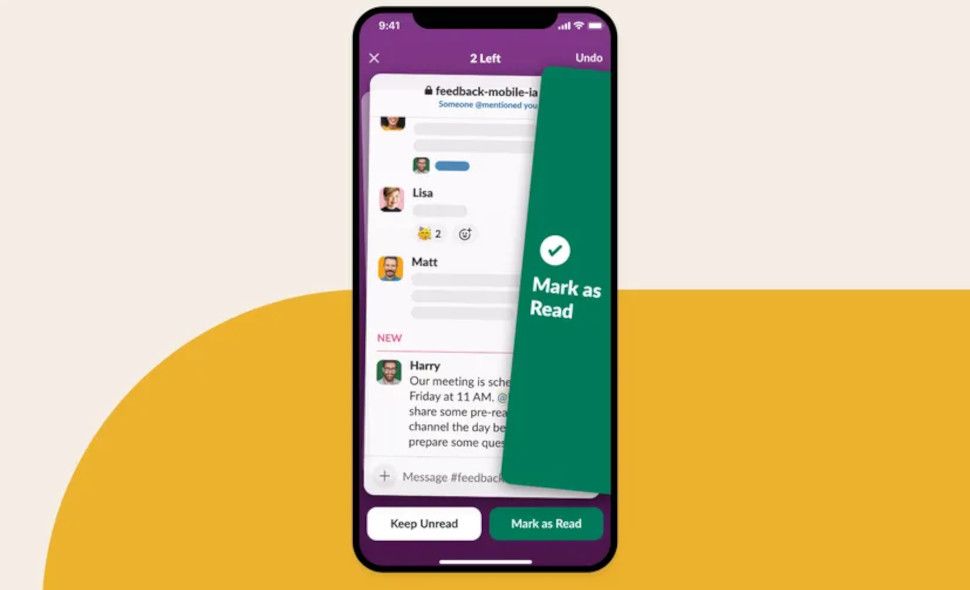
Slack users will now have the option to “Mark as Read” notifications from Slack, which, as the name implies, will mark the message as read from the notification window itself, removing the need to manually open the Slack application and check unread messages. Slack, a cloud-based team communication platform, is introducing a new feature that makes checking notifications easier.

First discovered by Android Authority, the option to mark messages as read via notifications has been introduced on Slack for Android. On the desktop, you can accomplish this by pressing a few key combinations, but until recently, the mobile app did not support this fast action. You typically need to go to the channel and tap on the “Mark as Read” button in order to designate a message as read. You can mark the notification as read or ignore it directly from the notification by selecting the option next to the “Reply” button.

However, the feature makes this easier by adding a new ‘Mark as Read’ option in the phone’s notification panel itself. According to reports, it shows up in the Slack for Android app next to the Reply button, which lets you mark a message as read or respond to it.

To mark a message as read in the mobile version of Slack, you often need to launch the app and see the channel. But it appears that a new update has been released that allows you to handle unread messages in a different way.

Only Slack for Android presently has this capability, which Gadgets 360 employees were able to confirm existed. The new functionality was not visible to every member, though. Reaching every Slack user may take some time because it is anticipated to be a gradual rollout.

Also worth reading
Slack Ties Slackbot Directly Into Salesforce Data And Apps Via Model Context Protocol Telegram Adds Public Post Search in Latest iOS and Android Update Google Drive’s Document Scanner Gets New Updates Slack Launches Platform for Building AI Agents and Apps Streamlined Tech News: AI Sends Summaries to Slack, Google Sheets WhatsApp Tests Left-Aligned Sidebar for Easier iPad Navigation

Additionally, earlier this month, 25 new artificial intelligence (AI) apps were added to the Slack marketplace. Asana, Adobe Express, Glean, Perplexity, Jasper, and Wiz are a few of these applications. According to the corporation, the introduction of these apps is intended to increase professional productivity because users won’t need to switch between apps to finish work.

From Asana and Wiz to Adobe Express and Perplexity, the new applications focus on productivity, content development and analysis, sales and marketing, and human resource (HR) and IT operations.

Slack will notify you if there are any unread messages waiting for you whenever a new message is added. Using keyboard commands and shortcuts like Esc and Shift Esc, you can rapidly mark messages as read in the desktop application. By pressing the Alt key and clicking on the message, you may also designate it as unread. Unread messages in mobile apps weren’t truly handled quickly, but that seems to be changing today.

It is a good quality-of-life element that we like, even though it is by no means a game changer. However, unlike the desktop app, it seems that the Android app does not yet have a Mark as Read feature on the Preferences page. So you still can’t adjust your Mark as Read choices in the mobile app.

Related Reading

More contextual TechBooky stories selected from tags, categories and article context.

  • slack_rts_api_1760110931697
    Slack Launches Platform for Building AI Agents and Apps
  • WA_NOTIFICATION_REMINDERS_FOR_MESSAGES_FEATURE_ANDROID
    WhatsApp Beta Adds Reminders, Tests Meta AI Voice Calls
  • startinghuddleingooglechat
    Google Chat Revamps 'Huddles' to Compete with Slack Meetings
  • WA_NOTIFICATION_REMINDERS_FOR_CHAT_MESSAGES_FEATURE_IOS
    WhatsApp for iOS Gets Message Reminder Feature
  • 489004786_460534553749625_8815815832330094324_n
    WhatsApp Releases Video Notes, Tappable Reactions,…
  • Building-the-Agentic-Enterprise_-Salesforce-Brings-Secure-Agentic-Collaboration-to-Slacks-Open-Platform
    Slack Ties Slackbot Directly Into Salesforce Data…
  • Useful-changes-made-to-the-Google-Messages-app
    Google Messages Adds Snooze and Delete Features
  • l170_7931583229821
    Google Chrome Update Disables Annoying Alerts
Keep Reading Smarter

Search TechBooky with AI

Use TechBooky's AI Search to explore the context behind this story and related coverage across the site.

Try AI Search
More On This Topic
Service news
Follow TechBooky

Follow TechBooky for more technology stories and newsroom updates.

f Facebook X X in LinkedIn ig Instagram wa WhatsApp

Tags: new featureslackslack android
Akinola Ajibola

Akinola Ajibola

Search TechBooky
Open TechBooky AI Search Try the AI Assistant

BROWSE BY CATEGORIES

Receive top tech news directly in your inbox

subscription from
Loading

Freshly Squeezed

  • Hugging Face Faces Deepfake Safety Questions After AI Forensics Study July 28, 2026
  • Recursive Superintelligence Signs $410M AWS Compute Deal July 28, 2026
  • Apple Upgrade Turns iPhones And Macs Into A Leasing Business July 28, 2026
  • Lyft And Baidu Start London Robotaxi Tests As Europe Race Heats Up July 28, 2026
  • PayPal Raises Profit Outlook As Turnaround Meets Takeover Speculation July 28, 2026
  • Microsoft Launches MAI-Cyber-1-Flash As AI Security Becomes A Model Race July 28, 2026
  • Anthropic Says It Does Not Want An Open-Weight AI Ban, But Still Wants Tough Rules July 28, 2026
  • X Money Launches In The US As Musk Moves X Closer To An Everything App July 28, 2026
  • Snapchat Brings Spotify Listening To Snap Map With Now Playing July 27, 2026
  • Threads Users Can Now DM Meta AI As The Assistant Moves Deeper Into Social Apps July 27, 2026
  • NVIDIA Launches Open Secure AI Alliance To Make Open Models A Cyber Defence Tool July 27, 2026
  • CXMT Surges 470% As China Bets Big On AI Memory Chips July 27, 2026

Browse Archives

July 2026
M T W T F S S
 12345
6789101112
13141516171819
20212223242526
2728293031  
« Jun    

Quick Links

  • About TechBooky
  • Advertise With TechBooky
  • Contact us
  • Submit Article
  • Privacy Policy
Generic selectors
Exact matches only
Search in title
Search in content
Post Type Selectors
Search in posts
Search in pages
  • African
  • Artificial Intelligence
  • Gadgets
  • Metaverse
  • Tips
  • AI Search
  • About TechBooky
  • Advertise With TechBooky
  • Submit Article
  • Contact us

© 2025 Designed By TechBooky Elite

Discover more from TechBooky

Subscribe now to keep reading and get access to the full archive.

Continue reading

We use cookies to ensure that we give you the best experience on our website. If you continue to use this site we will assume that you are happy with it.