TechBooky AI Assistant
👋 Welcome to TechBooky AI Assistant

I can help with:
🔎 Tech News
🤖 AI Topics
💻 Gadgets
☁️ Cloud
✍️ Guest Posts
📢 Advertising
🔗 Backlinks
📩 Newsletter
  • AI Search
  • Cryptocurrency
  • Earnings
  • Enterprise
  • About TechBooky
  • Submit Article
  • Advertise With TechBooky
  • Contact Us
TechBooky
  • African
  • AI
  • Metaverse
  • Gadgets
Generic selectors
Exact matches only
Search in title
Search in content
Post Type Selectors
Search in posts
Search in pages
  • African
  • AI
  • Metaverse
  • Gadgets
Generic selectors
Exact matches only
Search in title
Search in content
Post Type Selectors
Search in posts
Search in pages
TechBooky
Generic selectors
Exact matches only
Search in title
Search in content
Post Type Selectors
Search in posts
Search in pages
Home Internet

Microsoft Stops Using Bing to Redirect Google Users

Akinola Ajibola by Akinola Ajibola
January 16, 2025
in Internet
Share on FacebookShare on Twitter
Share this story

Send it to someone who should read it.

f Facebook X X in LinkedIn wa WhatsApp tg Telegram @ Email
In Brief
  • Microsoft has silently discontinued their faked Google UI, which was used to fool Bing users into thinking they were using Google.
  • Earlier this month, you could search for “Google” on Bing and obtain a page that looked very similar to Google, replete with a customized search bar,...
  • Many people, including Google, saw the move as dishonest because Bing offered what was effectively a clone of the Google experience while moving other results down...

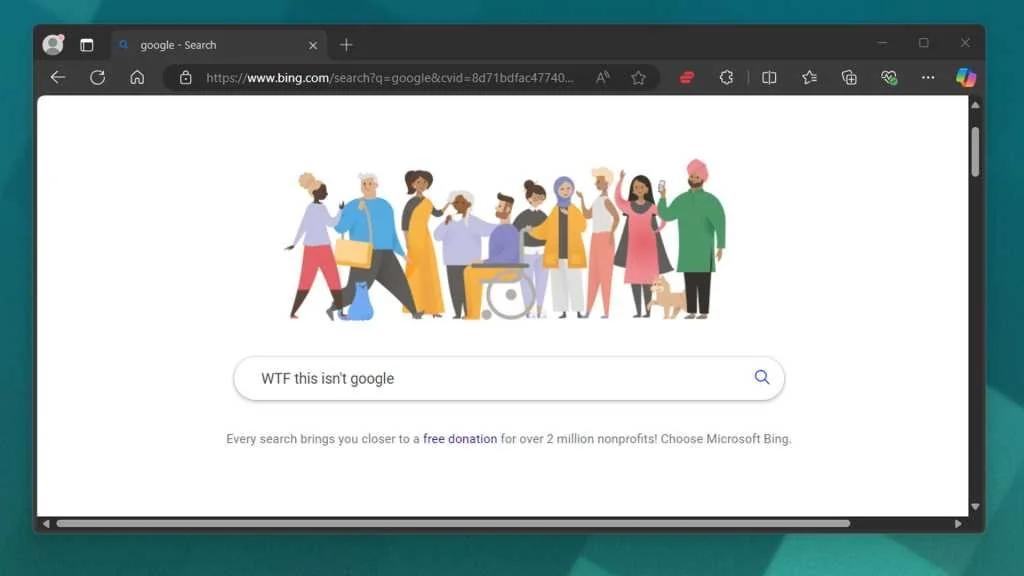
Microsoft has silently discontinued their faked Google UI, which was used to fool Bing users into thinking they were using Google. The tone down is an attempt to mislead users into using Bing. Earlier this month, you could search for “Google” on Bing and obtain a page that looked very similar to Google, replete with a customized search bar, an image resembling a Google Doodle, and even some little text beneath the search bar, much like Google search. Many people, including Google, saw the move as dishonest because Bing offered what was effectively a clone of the Google experience while moving other results down the page.

This week, just days after being spotted by Reddit users, the false UI no longer displays in Bing’s Google search results. Microsoft’s faked Google UI even scrolled down the page slightly to hide its own Bing search bar, which appears at the top of search results, in a clear attempt to deceive Bing users into thinking they were on Google.

Unless you’re looking for it, it’s easy to be duped into thinking you’re using Google rather than Bing, which appears to be the purpose.

This happens whenever you search “Google” on Bing while not logged into a Microsoft account. We confirmed that this occurs in both Microsoft Edge and Google Chrome, independent of normal or private browsing mode. It only stops if you are logged into a Microsoft account.

Microsoft refused to comment on its phony Google UI, but Google was more than ready to share its thoughts. “Imitation is the sincerest form of flattery, but Microsoft spoofing the Google homepage is another tactic in its long history of tricks to confuse users & limit choice,” said Google Chrome boss Parisa Tabriz in a post on X last week. “New year; new low Microsoft,” picking at the wound.

Microsoft has a history of using a number of techniques to get people to stick with the defaults of Bing and Microsoft Edge in Windows, such as altering Chrome download sites and displaying malware-like pop ups to induce people to ditch Google. Microsoft has previously had to reverse pop-up adverts within Google Chrome to remedy “unintended behaviour.”

Also worth reading
Google’s $15B Finland AI Bet Shows Compute Is Now An Energy Race Google’s AI Power Plan Gets A Nuclear Boost Microsoft’s Patch Tuesday Shows AI Is Finding Bugs Fast Sergey Brin’s Return Puts Gemini In War-Room Mode Google Brings Gemini Voice Into Gmail And Docs Google Escapes Ad Breakup But Must Change

Microsoft looks to be veering away from its contentious tactic; if you search for “Google” in Bing, you’re less likely to find a clone of Google’s UI.

During my testing, I could only view the Google-like version of Bing when I searched for “Google” in an InPrivate browser tab in Microsoft Edge. Any other combination of Microsoft Edge, Google Chrome, and logging in or utilizing a private tab displayed the standard Bing UI.

There is a chance that Microsoft is only testing the interface, and the results may differ from person to person. As far as I can tell, Microsoft has made no public comments about the Google UI clone.

Microsoft’s CEO, Satya Nadella, stated that Google’s search platform is so dominant that it makes more money on Windows than all of Microsoft, which is not surprising given the companies’ size and the extent to which their services overlap. Nadella also claimed that Google does not play fairly with Bing,

Microsoft has tried a variety of strategies to convert users to Bing over the years, including the Bing Wallpaper app, which encourages consumers to change their search engine. Microsoft has employed similar aggressive measures to promote its Edge browser, which uses Bing as the default search engine.

We will continue to monitor the situation around Bing and Google and will update this post with new information when it becomes available.

Related Reading

More contextual TechBooky stories selected from tags, categories and article context.

  • bloombergquint_2025-01-07_j0203afs_SS
    Microsoft's Bing Mimics Google to Mislead Users
  • nadella
    Satya Nadella Is Blaming Apple For Bing's Distant…
  • 67b191b5-5d6a-46a0-9623-b7068b6ff7ee-Q6HEIH
    Microsoft Update Impacts Google Accessibility Across Devices
  • meta
    Meta is Developing Its Own AI-Powered Search Engine
  • Google-Search-plus-menu-cover
    Google Search Introduces A New ‘Plus’ Menu
  • chatgpt_openai_reuters_1675831938432
    OpenAI is Challenging Google With a brand-new AI…
  • Screenshot
    Google Search With a Dedicated 'AI Mode' Launching Soon
  • google office
    Google Launches Desktop App for Windows with AI…
Keep Reading Smarter

Search TechBooky with AI

Use TechBooky's AI Search to explore the context behind this story and related coverage across the site.

Try AI Search
More On This Topic
Internet
Follow TechBooky

Follow TechBooky for more technology stories and newsroom updates.

f Facebook X X in LinkedIn ig Instagram wa WhatsApp

Tags: binggooglegoogle searchmicrosoft
Akinola Ajibola

Akinola Ajibola

Search TechBooky
Open TechBooky AI Search Try the AI Assistant

BROWSE BY CATEGORIES

Receive top tech news directly in your inbox

subscription from
Loading

Freshly Squeezed

  • Trezor Says 347,000 Users Were Targeted After Brevo Breach September 11, 2026
  • Fidji Simo Joins Nscale Board As AI Cloud IPO Talk Grows September 11, 2026
  • Matt Mullenweg Says He Is Back In Control At Automattic September 11, 2026
  • Meta’s Community Notes Test Raises Latin America Alarm September 11, 2026
  • OpenAI Faces Senate Questions Over Hugging Face AI Breach September 11, 2026
  • FairMoney’s 30M Users Show Nigeria’s Banking Shift September 11, 2026
  • California Puts New Guardrails On AI Chatbots For Kids September 11, 2026
  • Adobe’s AI Growth Still Leaves Wall Street Unsure September 11, 2026
  • OpenAI Brings ChatGPT To Wall Street Analyst Work September 11, 2026
  • Oracle Cloud Revenue Jumps 121% As AI Demand Pays Off September 11, 2026
  • OpenAI Pauses $200 Pro Signups As Astra Hits Compute Limits September 11, 2026
  • Anthropic Says It Foiled Claude Misuse In Cyberattacks And Surveillance September 10, 2026

Browse Archives

September 2026
M T W T F S S
 123456
78910111213
14151617181920
21222324252627
282930  
« Aug    

Quick Links

  • About TechBooky
  • Advertise With TechBooky
  • Contact us
  • Submit Article
  • Privacy Policy
Generic selectors
Exact matches only
Search in title
Search in content
Post Type Selectors
Search in posts
Search in pages
  • African
  • Artificial Intelligence
  • Gadgets
  • Metaverse
  • Tips
  • AI Search
  • About TechBooky
  • Advertise With TechBooky
  • Submit Article
  • Contact us

© 2025 Designed By TechBooky Elite

Discover more from TechBooky

Subscribe now to keep reading and get access to the full archive.

Continue reading

We use cookies to ensure that we give you the best experience on our website. If you continue to use this site we will assume that you are happy with it.